Kafka Consumers
What is a consumer?
Section titled “What is a consumer?”Kafka consumers are client applications that read (consume) messages from Kafka topics. They are fundamental for retrieving and processing data from a Kafka cluster. Consumers connect to Kafka brokers, subscribe to one or more topics, and continuously poll for new messages to process.
How consumers work
Section titled “How consumers work”A consumer subscribes to one or more topics and fetches messages from assigned partitions.
Kafka tracks the offset (position) of each message consumed, enabling consumers to resume from where they left off in case of restarts or failures.
Multiple consumers can be grouped into a consumer group. Each consumer in a group is assigned a subset of partitions, allowing for parallel processing and scaling. No two consumers in the same group will read the same partition at the same time.
Multiple consumer groups can independently consume the same data from a topic, supporting different applications or processing pipelines.
Example Use Cases
Section titled “Example Use Cases”- Real-time analytics
- Event-driven microservices
- Data ingestion pipelines
Key Configuration Tips
Section titled “Key Configuration Tips”-
Use a unique
group.idfor each logical application or processing pipeline. -
Decide between automatic (
enable.auto.commit=true) and manual offset commits depending on your required processing guarantees. -
Adjust
max.poll.recordsandmax.poll.interval.msbased on your message processing time and throughput needs. -
Set up security parameters (
security.protocol, SSL/SASL configs) if your Kafka cluster requires authentication or encryption.
View consumer list and consumer metrics
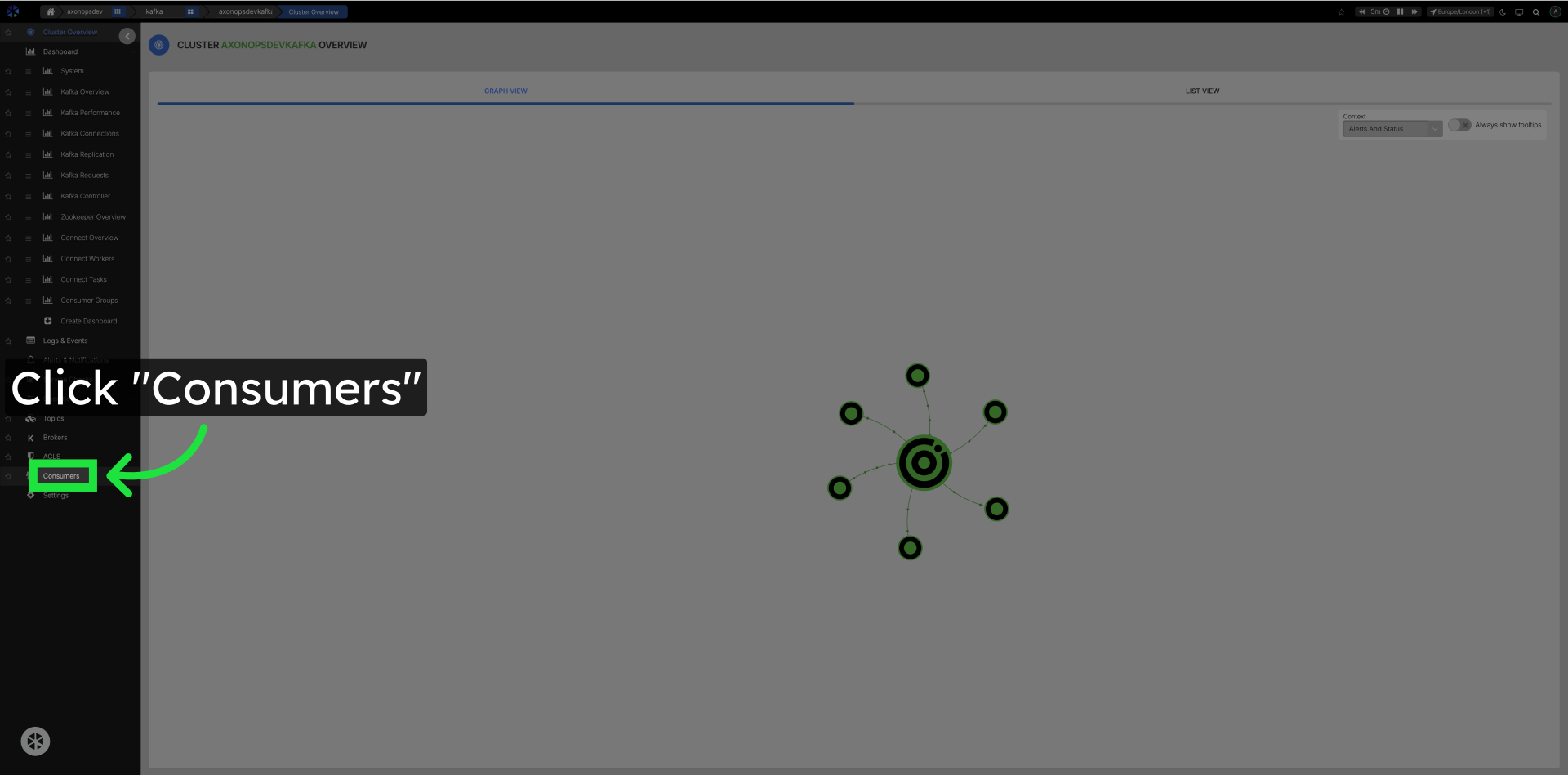
Section titled “View consumer list and consumer metrics”Click Consumers in the left navigation
Section titled “Click Consumers in the left navigation”Navigate to the Consumers section.

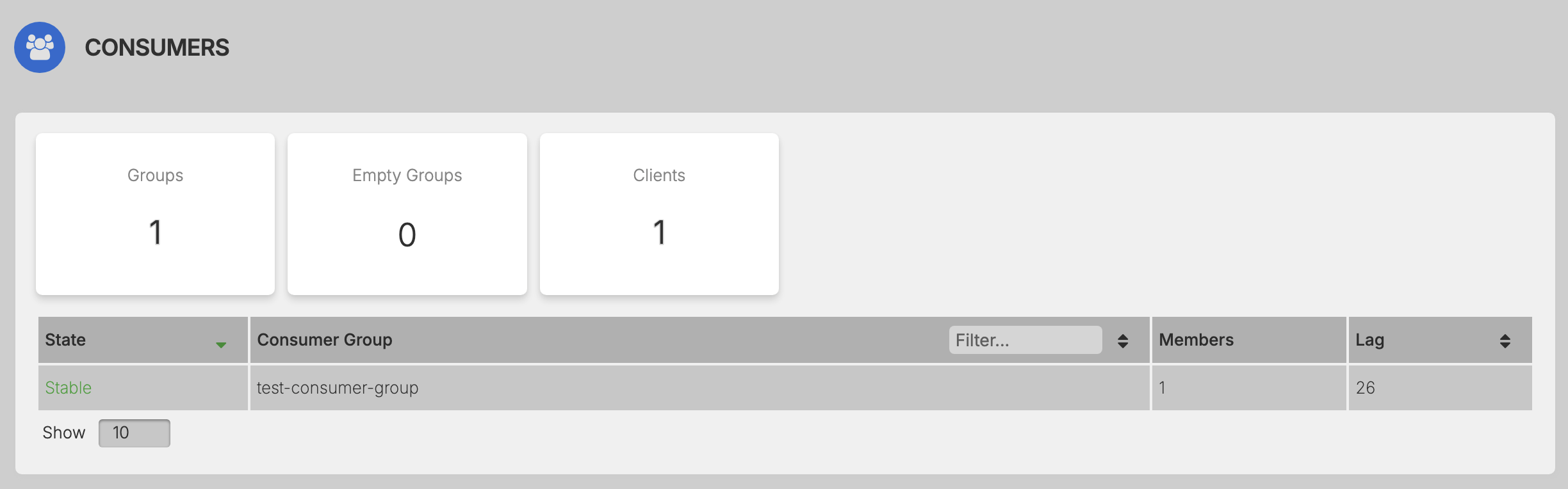
Click any of the consumers in the list
Section titled “Click any of the consumers in the list”
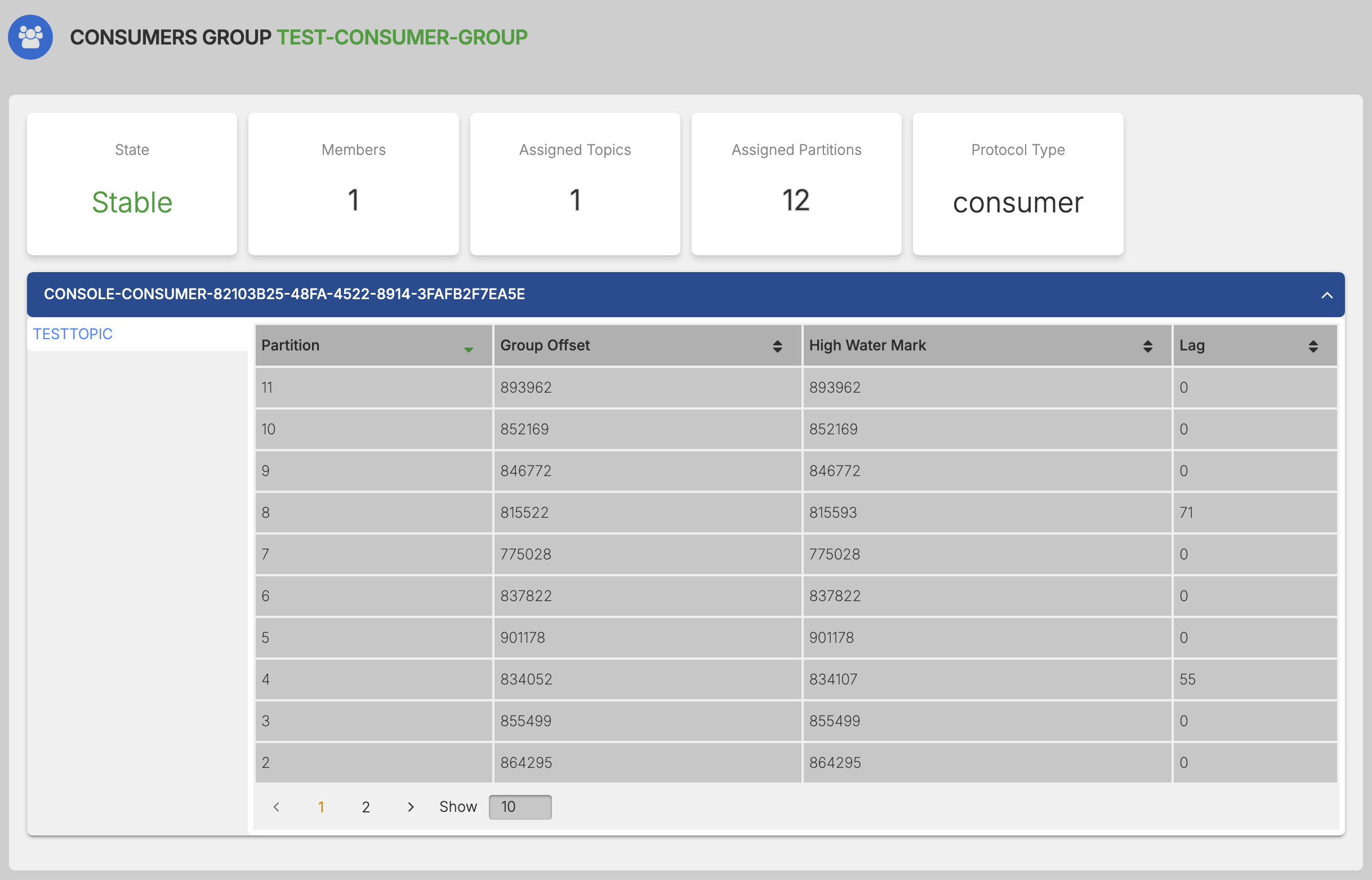
Partitions and Consumer Overview
Section titled “Partitions and Consumer Overview”
Deleting a consumer group
Section titled “Deleting a consumer group”A Kafka consumer group can be deleted from the Consumers page. Each row in the consumer group list carries a Delete action in the Actions column.
To delete a group, click Delete on its row and confirm the action in the dialog that appears. On confirmation, AxonOps issues the deletion to the broker and removes the group from the list.
Deletion is destructive and cannot be undone
Deleting a consumer group discards every offset the group has committed. Once the deletion is applied, Kafka retains no record of the group's read position in any partition.
A consumer that later rejoins under the same group.id finds no committed offset and falls back to its auto.offset.reset policy:
earliest— the consumer reprocesses the entire retained history of every subscribed partition.latest— the consumer resumes at the end of each partition. Records produced between the deletion and the restart are never delivered to the group.none— the consumer raises an error and does not start.
Committed offsets should be recorded before deletion if the group may be recreated.
The group must be empty
Section titled “The group must be empty”A group can only be deleted once it holds no active members, that is, once it is in the Empty or Dead state. Every consumer in the group must be shut down, and the broker must have observed their departure, either through a clean leave or through expiry of session.timeout.ms.
While a group retains at least one active member, its Delete action is disabled, and hovering over it shows the message Consumer group must be empty to delete. The action becomes available once the group is empty.
Required permission
Section titled “Required permission”The Actions column, and therefore the Delete action, is visible only to members with the admin role. Members with the readonly or backupadmin role do not see the action and cannot delete a group.
Audit log
Section titled “Audit log”A successful deletion is recorded in the AxonOps audit log as Delete Kafka consumer group, with the deleted group identifier as the target.
Supported versions
Section titled “Supported versions”Consumer group deletion requires axon-server 2.0.31 and axon-agent 2.0.24 or later on the cluster.