axon-agent connects securely to the following AxonOps Cloud service endpoint:
https://agents.axonops.cloud
The TLS HTTPS connection initiated by the agent is upgraded to a WebSocket connection and thus requires WebSocket support in your corporate infrastructure, such as a secure web proxy service.
If you have a DNS-based security policy, you must allow outbound access to the following domain.
agents.axonops.cloud
If you have an IP address-based security policy, you must open access to the IP address ranges provided in the following links.
The AxonOps Cassandra Agent is the jar that is directly loaded by Cassandra.
The AxonOps Cassandra Agent then reaches out directly to the AxonOps Agent binary
which contacts the AxonOps Server directly.
The axon-agent is a dependency of the AxonOps Cassandra Agent. This binary
contacts the AxonOps Server directly while minimizing the memory footprint
and CPU utilization of the Cassandra process.
Update the following highlighted lines from /etc/axonops/axon-agent.yml:
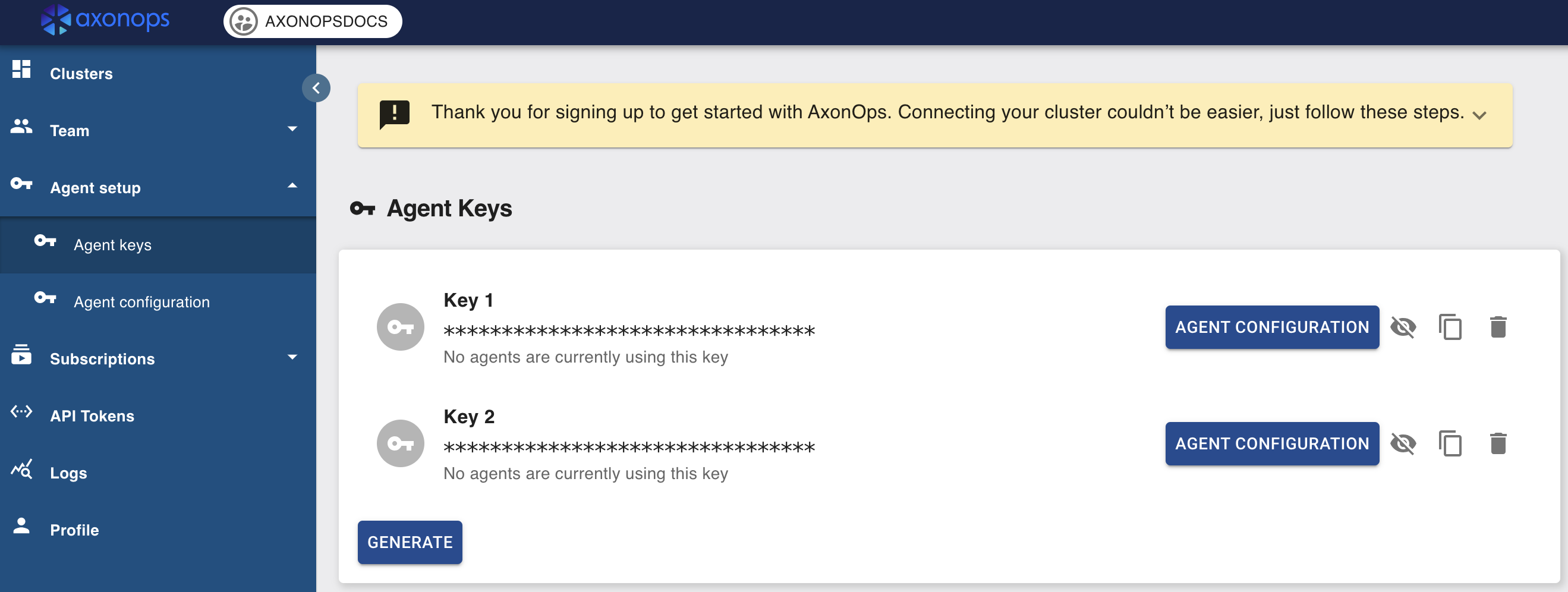
Please update the key and org values, they can be viewed by logging into console.axonops.cloud
Organization (org) name is next to the logo in the console
Agent Keys (key) found in Agent Setup
If there is a Dedicated NTP server in your Organization please uncomment and update the NTP section.
  axon-server:
      hosts: "agents.axonops.cloud"

  axon-agent:
      key: <THIS_IS_A_DUMMY_KEY_PLEASE_UPDATE>
      org: <THIS_IS_A_DUMMY_ORG_NAME_PLEASE_UPDATE>

  # Specify the NTP server IP addresses or hostnames configured for your Cassandra hosts
  # if using Cassandra deployed in Kubernetes or if auto-detection fails.
  # The port defaults to 123 if not specified.
  # NTP:
  #    hosts:
  #        - "x.x.x.x:123"
  # Optionally restrict which commands can be executed by axon-agent.
  # If "true", only scripts placed in scripts_location can be executed by axon-agent.
  # disable_command_exec: false
  # If disable_command_exec is true then axon-agent is only allowed to execute scripts
  # under this path
  # scripts_location: /var/lib/axonops/scripts/
Set file permissions on /etc/axonops/axon-agent.yml file by executing the following command
If Cassandra was installed using a tarball, the correct path for the cassandra-env.sh
will be <Cassandra Installation Directory>/conf/cassandra-env.sh.
NB. Make sure this configuration is not overridden by automation tools.
If Cassandra was setup to use a non-default user or group,
CASSANDRA_GROUP and/or CASSANDRA_USER
will need be updated accordingly for the above commands to work properly.
The AxonOps Kafka Agent is the jar that is directly loaded by Kafka.
The AxonOps Kafka Agent then reaches out directly to the AxonOps Agent binary
which contacts the AxonOps Server directly.
The AxonOps Agent is a dependency of the AxonOps Kafka Agent. This binary
contacts the AxonOps Server directly while minimizing the memory footprint
and CPU utilization of the Kafka process.
Organization (org) can be found next to the logo at the top of the console.
Agent Keys (key) can be found within Agent setup > Agent keys.
If there is a Dedicated NTP server in your Organization please uncomment and update the NTP section.
axon-server:hosts:"agents.axonops.cloud"# AxonOps SaaS# hosts: "${AXONOPS_SERVER_HOSTS}" # AxonOps Server On-Premise Endpoint# port: 1888 # AxonOps Server On-Premise Port (Default is 1888)axon-agent:key:"<THIS_IS_A_DUMMY_KEY_PLEASE_UPDATE>"org:"<THIS_IS_A_DUMMY_ORG_NAME_PLEASE_UPDATE>"cluster_name:"<THIS_IS_A_DUMMY_CLUSTER_NAME_PLEASE_UPDATE>"tls:mode:"TLS"# disabled, TLS#skipVerify: false # Disables CA and Hostname verification#caFile: "path_to_certs_on_axon_agent_node.crt" # required if skipVerify is not set and you are using a self-signed cert#certFile: "path_to_certs_on_axon_agent_node.crt"#keyFile: "path_to_key_file_on_axon_agent_node.key"# Specify the NTP server IP addresses or hostnames configured for your hosts# The port defaults to 123 if not specified.# NTP:# hosts:# - "x.x.x.x:123"# Optionally restrict which commands can be executed by axon-agent.# If "true", only scripts placed in scripts_location can be executed by axon-agent.# disable_command_exec: false# If disable_command_exec is true then axon-agent is only allowed to execute scripts# under this path# scripts_location: /var/lib/axonops/scripts/kafka:node_type:"broker"# broker, kraft-broker, kraft-controller, zookeeper, connect# rack: "testrack" # Auto-detected from Kafka config, optionally override the rack to group nodes in AxonOpskafka_client:brokers:["<host_listener_ip_address_or_fqdn>:<port>>"]# 10.0.0.2:9092 or 10.20.30.40:9094 or this_is_my_server.domain.com:9093# Authentication Settingssasl:username:<THIS_IS_A_DUMMY_USERNAME_PLEASE_UPDATE>password:<THIS_IS_A_DUMMY_PASSWORD_PLEASE_UPDATE>mechanism:PLAIN# SCRAM-SHA-256, SCRAM-SHA-512, OAUTHBEARER, GSSAPI# For oauth support# oauth:# token:# clientId:# clientSecret:# tokenEndpoint:# scope:# For gssapi support# gssapi:# authType:# keyTabPath:# kerberosConfigPath:# serviceName:# username:# password:# realm:# enableFast: true# SSL settings for connection to Kafkatls:enabled:truecaFilepath:<THIS_IS_A_DUMMY_CA_PATH_PLEASE_UPDATE>insecureSkipTlsVerify:false
axon-server:hosts:"agents.axonops.cloud"# AxonOps SaaS# hosts: "${AXONOPS_SERVER_HOSTS}" # AxonOps Server On-Premise Endpoint# port: 1888 # AxonOps Server On-Premise Port (Default is 1888)axon-agent:key:"<THIS_IS_A_DUMMY_KEY_PLEASE_UPDATE>"org:"<THIS_IS_A_DUMMY_ORG_NAME_PLEASE_UPDATE>"cluster_name:"<THIS_IS_A_DUMMY_CLUSTER_NAME_PLEASE_UPDATE>"tls:mode:"TLS"# disabled, TLS#skipVerify: false # Disables CA and Hostname verification#caFile: "path_to_certs_on_axon_agent_node.crt" # required if skipVerify is not set and you are using a self-signed cert#certFile: "path_to_certs_on_axon_agent_node.crt"#keyFile: "path_to_key_file_on_axon_agent_node.key"# Specify the NTP server IP addresses or hostnames configured for your hosts# The port defaults to 123 if not specified.# NTP:# hosts:# - "x.x.x.x:123"# Optionally restrict which commands can be executed by axon-agent.# If "true", only scripts placed in scripts_location can be executed by axon-agent.# disable_command_exec: false# If disable_command_exec is true then axon-agent is only allowed to execute scripts# under this path# scripts_location: /var/lib/axonops/scripts/kafka:node_type:"zookeeper"# broker, kraft-broker, kraft-controller, zookeeper, connect# rack: "testrack" # Optionally specify a rack to group nodes in AxonOps
axon-server:hosts:"agents.axonops.cloud"# AxonOps SaaS# hosts: "${AXONOPS_SERVER_HOSTS}" # AxonOps Server On-Premise Endpoint# port: 1888 # AxonOps Server On-Premise Port (Default is 1888)axon-agent:key:"<THIS_IS_A_DUMMY_KEY_PLEASE_UPDATE>"org:"<THIS_IS_A_DUMMY_ORG_NAME_PLEASE_UPDATE>"cluster_name:"<THIS_IS_A_DUMMY_CLUSTER_NAME_PLEASE_UPDATE>"tls:mode:"TLS"# disabled, TLS#skipVerify: false # Disables CA and Hostname verification#caFile: "path_to_certs_on_axon_agent_node.crt" # required if skipVerify is not set and you are using a self-signed cert#certFile: "path_to_certs_on_axon_agent_node.crt"#keyFile: "path_to_key_file_on_axon_agent_node.key"# Specify the NTP server IP addresses or hostnames configured for your hosts# The port defaults to 123 if not specified.# NTP:# hosts:# - "x.x.x.x:123"# Optionally restrict which commands can be executed by axon-agent.# If "true", only scripts placed in scripts_location can be executed by axon-agent.# disable_command_exec: false# If disable_command_exec is true then axon-agent is only allowed to execute scripts# under this path# scripts_location: /var/lib/axonops/scripts/kafka:node_type:"kraft-broker"# broker, kraft-broker, kraft-controller, zookeeper, connect# rack: "testrack" # Auto-detected from Kafka config, optionally override the rack to group nodes in AxonOpskafka_client:brokers:["<host_listener_ip_address_or_fqdn>:<port>>"]# 10.0.0.2:9092 or 10.20.30.40:9094 or this_is_my_server.domain.com:9093# Authentication Settingssasl:username:<THIS_IS_A_DUMMY_USERNAME_PLEASE_UPDATE>password:<THIS_IS_A_DUMMY_PASSWORD_PLEASE_UPDATE>mechanism:PLAIN# SCRAM-SHA-256, SCRAM-SHA-512, OAUTHBEARER, GSSAPI# For oauth support# oauth:# token:# clientId:# clientSecret:# tokenEndpoint:# scope:# For gssapi support# gssapi:# authType:# keyTabPath:# kerberosConfigPath:# serviceName:# username:# password:# realm:# enableFast: true# SSL settings for connection to Kafkatls:enabled:truecaFilepath:<THIS_IS_A_DUMMY_CA_PATH_PLEASE_UPDATE>insecureSkipTlsVerify:false
axon-server:hosts:"agents.axonops.cloud"# AxonOps SaaS# hosts: "${AXONOPS_SERVER_HOSTS}" # AxonOps Server On-Premise Endpoint# port: 1888 # AxonOps Server On-Premise Port (Default is 1888)axon-agent:key:"<THIS_IS_A_DUMMY_KEY_PLEASE_UPDATE>"org:"<THIS_IS_A_DUMMY_ORG_NAME_PLEASE_UPDATE>"cluster_name:"<THIS_IS_A_DUMMY_CLUSTER_NAME_PLEASE_UPDATE>"tls:mode:"TLS"# disabled, TLS#skipVerify: false # Disables CA and Hostname verification#caFile: "path_to_certs_on_axon_agent_node.crt" # required if skipVerify is not set and you are using a self-signed cert#certFile: "path_to_certs_on_axon_agent_node.crt"#keyFile: "path_to_key_file_on_axon_agent_node.key"# Specify the NTP server IP addresses or hostnames configured for your hosts# The port defaults to 123 if not specified.# NTP:# hosts:# - "x.x.x.x:123"# Optionally restrict which commands can be executed by axon-agent.# If "true", only scripts placed in scripts_location can be executed by axon-agent.# disable_command_exec: false# If disable_command_exec is true then axon-agent is only allowed to execute scripts# under this path# scripts_location: /var/lib/axonops/scripts/kafka:node_type:"kraft-controller"# broker, kraft-broker, kraft-controller, zookeeper, connect# rack: "testrack" # Auto-detected from Kafka config, optionally override the rack to group nodes in AxonOpskafka_client:brokers:["<host_listener_ip_address_or_fqdn>:<port>>"]# 10.0.0.2:9092 or 10.20.30.40:9094 or this_is_my_server.domain.com:9093# Authentication Settingssasl:username:<THIS_IS_A_DUMMY_USERNAME_PLEASE_UPDATE>password:<THIS_IS_A_DUMMY_PASSWORD_PLEASE_UPDATE>mechanism:PLAIN# SCRAM-SHA-256, SCRAM-SHA-512, OAUTHBEARER, GSSAPI# For oauth support# oauth:# token:# clientId:# clientSecret:# tokenEndpoint:# scope:# For gssapi support# gssapi:# authType:# keyTabPath:# kerberosConfigPath:# serviceName:# username:# password:# realm:# enableFast: true# SSL settings for connection to Kafkatls:enabled:truecaFilepath:<THIS_IS_A_DUMMY_CA_PATH_PLEASE_UPDATE>insecureSkipTlsVerify:false
axon-server:hosts:"agents.axonops.cloud"# AxonOps SaaS# hosts: "${AXONOPS_SERVER_HOSTS}" # AxonOps Server On-Premise Endpoint# port: 1888 # AxonOps Server On-Premise Port (Default is 1888)axon-agent:key:"<THIS_IS_A_DUMMY_KEY_PLEASE_UPDATE>"org:"<THIS_IS_A_DUMMY_ORG_NAME_PLEASE_UPDATE>"cluster_name:"<THIS_IS_A_DUMMY_CLUSTER_NAME_PLEASE_UPDATE>"tls:mode:"TLS"# disabled, TLS#skipVerify: false # Disables CA and Hostname verification#caFile: "path_to_certs_on_axon_agent_node.crt" # required if skipVerify is not set and you are using a self-signed cert#certFile: "path_to_certs_on_axon_agent_node.crt"#keyFile: "path_to_key_file_on_axon_agent_node.key"# Specify the NTP server IP addresses or hostnames configured for your hosts# The port defaults to 123 if not specified.# NTP:# hosts:# - "x.x.x.x:123"# Optionally restrict which commands can be executed by axon-agent.# If "true", only scripts placed in scripts_location can be executed by axon-agent.# disable_command_exec: false# If disable_command_exec is true then axon-agent is only allowed to execute scripts# under this path# scripts_location: /var/lib/axonops/scripts/kafka:node_type:"connect"# broker, kraft-broker, kraft-controller, zookeeper, connect# rack: "testrack" # Optionally specify a rack to group nodes in AxonOps
Set file permissions on /etc/axonops/axon-agent.yml file by executing the following command
To load the AxonOps Java Agent and Zookeeper config changes please either start the Zookeeper service if stopped or restart the Zookeeper service if already running.
To load the AxonOps Java Agent and Kafka KRaft config changes please either start the Kafka KRaft service if stopped or restart the Kafka KRaft service if already running.
To load the AxonOps Java Agent and Kafka KRaft config changes please either start the Kafka KRaft service if stopped or restart the Kafka KRaft service if already running.
To load the AxonOps Java Agent and Kafka Connect config changes please either:
* Start the Kafka Connect service if stopped.
* Restart the Kafka Connect service if already running.