K8ssandra Cassandra Cluster with axon-agent
This section explains how to deploy a K8ssandra-managed Cassandra cluster on Kubernetes with integrated AxonOps monitoring agent.
Components
- K8ssandra Operator - Kubernetes operator for managing Cassandra clusters
- cert-manager (Recommended) - Automatic TLS certificate management
Overview
This deployment creates a production-ready Cassandra cluster with:
- Cassandra 5.0.6+ with axon-agent pre-integrated
- Multi-datacenter support
- Configurable resource allocation
- Persistent storage with custom storage classes
- axon-agent for comprehensive monitoring and management
Architecture
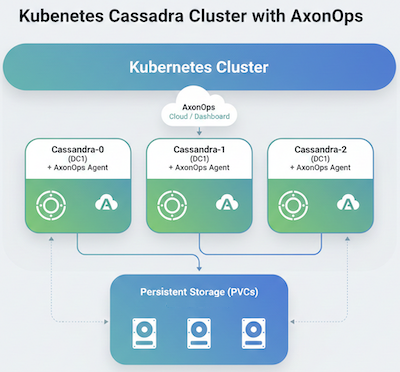
Prerequisites
- Kubernetes cluster (v1.23+)
- AxonOps Server deployed and accessible
- kubectl configured to access your cluster
- Helm 3 installed
- AxonOps API key and organization name for agent authentication
Step 1: Install cert-manager
Install cert-manager for automatic TLS certificate management:
helm upgrade --install \
  cert-manager oci://quay.io/jetstack/charts/cert-manager \
  --version v1.19.1 \
  --namespace cert-manager \
  --create-namespace \
  --set crds.enabled=true
Step 2: Install K8ssandra Operator
Add the K8ssandra Helm repository and install the operator:
helm repo add k8ssandra https://helm.k8ssandra.io/stable
helm repo update

helm upgrade --install k8ssandra-operator k8ssandra/k8ssandra-operator \
  -n k8ssandra-operator \
  --create-namespace \
  --set image.tag=v1.29.0
Verify the operator is running:
kubectl get pods -n k8ssandra-operator
Expected output:
NAME                                                READY   STATUS    RESTARTS   AGE
k8ssandra-operator-cass-operator-xxx-xxx           1/1     Running   0          30s
k8ssandra-operator-controller-manager-xxx-xxx      1/1     Running   0          30s
Step 3: Create K8ssandra Cluster
Configuration Variables
Before deploying, configure these variables according to your environment:
| Variable | Meaning / What To Set | Example Value |
|---|---|---|
CLUSTER_NAME |
Name of your Cassandra cluster | axonops-k8ssandra-5 |
NAMESPACE |
Kubernetes namespace for the cluster | k8ssandra-operator |
CASSANDRA_VERSION |
Cassandra version to deploy | 5.0.6 |
DATACENTER_NAME |
Name for the datacenter | dc1 |
DATACENTER_SIZE |
Number of Cassandra nodes | 3 |
STORAGE_CLASS |
Storage class for persistent volumes | cluster default |
STORAGE_SIZE |
Size of storage per node | 2Gi |
HEAP_SIZE |
JVM heap size (initial and max) | 1G |
CPU_LIMIT |
CPU limit per pod | 1 or 2000m |
MEMORY_LIMIT |
Memory limit per pod | 2Gi |
AXON_AGENT_KEY |
Your AxonOps API key for authentication | Use a Kubernetes Secret |
AXON_AGENT_ORG |
Your AxonOps organization identifier | your-org-name |
AXON_AGENT_SERVER_HOST |
DNS name/address of AxonOps server | axon-server-agent.axonops.svc.cluster.local |
AXON_AGENT_SERVER_PORT |
Port for axon-agent connections | 1888 |
AXON_AGENT_TLS_MODE |
Whether agent uses TLS (true or false) |
false |
Basic Cluster Configuration
Create a file named k8ssandra-cluster.yaml:
apiVersion: k8ssandra.io/v1alpha1
kind: K8ssandraCluster
metadata:
  name: ${CLUSTER_NAME}
  namespace: ${NAMESPACE}
spec:
  cassandra:
    serverVersion: "${CASSANDRA_VERSION}"
    serverImage: ghcr.io/axonops/k8ssandra/cassandra:${CASSANDRA_VERSION}-v0.1.111-1.2.0
    softPodAntiAffinity: true
    resources:
      limits:
        cpu: ${CPU_LIMIT}
        memory: ${MEMORY_LIMIT}
      requests:
        cpu: 1
        memory: 1Gi
    datacenters:
      - metadata:
          name: ${DATACENTER_NAME}
        size: ${DATACENTER_SIZE}
        containers:
          - name: cassandra
            env:
              - name: AXON_AGENT_KEY
                value: "${AXON_AGENT_KEY}"
              - name: AXON_AGENT_ORG
                value: "${AXON_AGENT_ORG}"
              - name: AXON_AGENT_SERVER_HOST
                value: "${AXON_AGENT_SERVER_HOST}"
              - name: AXON_AGENT_SERVER_PORT
                value: "${AXON_AGENT_SERVER_PORT}"
              - name: AXON_AGENT_TLS_MODE
                value: "${AXON_AGENT_TLS_MODE}"
        config:
          jvmOptions:
            heap_initial_size: ${HEAP_SIZE}
            heap_max_size: ${HEAP_SIZE}
        storageConfig:
          cassandraDataVolumeClaimSpec:
            storageClassName: ${STORAGE_CLASS}
            accessModes:
              - ReadWriteOnce
            resources:
              requests:
                storage: ${STORAGE_SIZE}
Example Configuration
Here's a complete example for a 3-node cluster:
apiVersion: k8ssandra.io/v1alpha1
kind: K8ssandraCluster
metadata:
  name: axonops-k8ssandra-5
  namespace: k8ssandra-operator
spec:
  cassandra:
    serverVersion: "5.0.6"
    serverImage: ghcr.io/axonops/k8ssandra/cassandra:5.0.6-v0.1.111-1.2.0
    softPodAntiAffinity: true
    resources:
      limits:
        cpu: 2
        memory: 12Gi
      requests:
        cpu: 1
        memory: 8Gi
    datacenters:
      - metadata:
          name: dc1
        size: 3
        containers:
          - name: cassandra
            env:
              - name: AXON_AGENT_KEY
                valueFrom:
                  secretKeyRef:
                    name: axonops-credentials
                    key: api-key
              - name: AXON_AGENT_ORG
                valueFrom:
                  secretKeyRef:
                    name: axonops-credentials
                    key: org
              - name: AXON_AGENT_SERVER_HOST
                value: "axon-server-agent.axonops.svc.cluster.local"
              - name: AXON_AGENT_SERVER_PORT
                value: "1888"
              - name: AXON_AGENT_TLS_MODE
                value: "false"
        config:
          jvmOptions:
            heap_initial_size: 8G
            heap_max_size: 8G
        storageConfig:
          cassandraDataVolumeClaimSpec:
            storageClassName: ""
            accessModes:
              - ReadWriteOnce
            resources:
              requests:
                storage: 10Gi
Step 4: Deploy the Cluster
Apply the cluster configuration:
kubectl apply -f k8ssandra-cluster.yaml
Monitor the deployment:
# Watch the K8ssandraCluster status
kubectl get k8ssandracluster -n k8ssandra-operator -w

# Watch pods being created
kubectl get pods -n k8ssandra-operator -w
Verification
Check Cluster Status
Check the K8ssandraCluster resource:
kubectl get k8ssandracluster -n k8ssandra-operator
Expected output:
NAME                  AGE
axonops-k8ssandra-5   5m
Get detailed status:
kubectl describe k8ssandracluster axonops-k8ssandra-5 -n k8ssandra-operator
Check Pod Status
Verify all Cassandra pods are running:
kubectl get pods -n k8ssandra-operator -l app.kubernetes.io/managed-by=cass-operator
Expected output:
NAME                             READY   STATUS    RESTARTS   AGE
axonops-k8ssandra-5-dc1-rack1-0  2/2     Running   0          5m
axonops-k8ssandra-5-dc1-rack1-1  2/2     Running   0          4m
axonops-k8ssandra-5-dc1-rack1-2  2/2     Running   0          3m
Check Storage
Verify persistent volume claims are bound:
kubectl get pvc -n k8ssandra-operator
Expected output:
NAME                                        STATUS   VOLUME   CAPACITY   ACCESS MODES   STORAGECLASS
server-data-axonops-k8ssandra-5-dc1-rack1-0 Bound    pv-xxx   10Gi       RWO            local-path
server-data-axonops-k8ssandra-5-dc1-rack1-1 Bound    pv-xxx   10Gi       RWO            local-path
server-data-axonops-k8ssandra-5-dc1-rack1-2 Bound    pv-xxx   10Gi       RWO            local-path
Verify Cassandra Cluster
Connect to a Cassandra pod and check the cluster status:
kubectl exec -it axonops-k8ssandra-5-dc1-rack1-0 -n k8ssandra-operator -c cassandra -- nodetool status
Expected output:
Datacenter: dc1
===============
Status=Up/Down
|/ State=Normal/Leaving/Joining/Moving
--  Address     Load       Tokens  Owns    Host ID                               Rack
UN  10.42.0.10  100 KB     16      33.3%   xxx-xxx-xxx-xxx-xxx                   rack1
UN  10.42.0.11  100 KB     16      33.3%   xxx-xxx-xxx-xxx-xxx                   rack1
UN  10.42.0.12  100 KB     16      33.4%   xxx-xxx-xxx-xxx-xxx                   rack1
Verify axon-agent Connection
Check the Cassandra logs for axon-agent connection:
kubectl logs axonops-k8ssandra-5-dc1-rack1-0 -n k8ssandra-operator -c cassandra | grep -i axon
You should see log entries indicating the agent has connected to the AxonOps server.
Cluster Configuration Details
Cassandra Settings
| Setting | Value | Description |
|---|---|---|
| Cassandra Version | 5.0.6+ | Apache Cassandra version with axon-agent |
| Container Image | ghcr.io/axonops/k8ssandra/cassandra | Pre-built image with axon-agent |
| Anti-Affinity | Soft | Prefers to schedule pods on different nodes |
| Default Replicas | 3 | Number of Cassandra nodes per datacenter |
Resource Configuration
resources:
  limits:
    cpu: 2
    memory: 4Gi
  requests:
    cpu: 1
    memory: 2Gi
JVM Settings
jvmOptions:
  heap_initial_size: 2G
  heap_max_size: 2G
Warning
Ensure heap size is set appropriately based on available memory. A general rule is to set the heap to 25-50% of the available RAM, with a maximum of 8GB for optimal GC performance.
Advanced Configuration
Multi-Datacenter Set up
To deploy a multi-datacenter cluster:
apiVersion: k8ssandra.io/v1alpha1
kind: K8ssandraCluster
metadata:
  name: axonops-k8ssandra-multi-dc
  namespace: k8ssandra-operator
spec:
  cassandra:
    serverVersion: "5.0.6"
    serverImage: ghcr.io/axonops/k8ssandra/cassandra:5.0.6-v0.1.111-1.2.0
    datacenters:
      - metadata:
          name: dc1
        size: 3
        containers:
          - name: cassandra
            env:
              - name: AXON_AGENT_KEY
                valueFrom:
                  secretKeyRef:
                    name: axonops-credentials
                    key: api-key
              - name: AXON_AGENT_ORG
                valueFrom:
                  secretKeyRef:
                    name: axonops-credentials
                    key: org
              - name: AXON_AGENT_CLUSTER_NAME
                value: "k8ssandra-multi-dc"
        storageConfig:
          cassandraDataVolumeClaimSpec:
            storageClassName: local-path
            accessModes:
              - ReadWriteOnce
            resources:
              requests:
                storage: 10Gi
      - metadata:
          name: dc2
        size: 3
        containers:
          - name: cassandra
            env:
              - name: AXON_AGENT_KEY
                valueFrom:
                  secretKeyRef:
                    name: axonops-credentials
                    key: api-key
              - name: AXON_AGENT_ORG
                valueFrom:
                  secretKeyRef:
                    name: axonops-credentials
                    key: org
              - name: AXON_AGENT_CLUSTER_NAME
                value: "k8ssandra-multi-dc"
        storageConfig:
          cassandraDataVolumeClaimSpec:
            storageClassName: local-path
            accessModes:
              - ReadWriteOnce
            resources:
              requests:
                storage: 10Gi
Using Secrets for AxonOps Credentials
For better security, store AxonOps credentials in a Kubernetes Secret:
kubectl create secret generic axonops-credentials \
  -n k8ssandra-operator \
  --from-literal=api-key='your-api-key-here' \
  --from-literal=org='your-org-name'
Reference the secret in your cluster configuration:
containers:
  - name: cassandra
    env:
      - name: AXON_AGENT_KEY
        valueFrom:
          secretKeyRef:
            name: axonops-credentials
            key: api-key
      - name: AXON_AGENT_ORG
        valueFrom:
          secretKeyRef:
            name: axonops-credentials
            key: org
Accessing the Cluster
Using kubectl port-forward
Forward the CQL port to your local machine:
kubectl port-forward -n k8ssandra-operator svc/axonops-k8ssandra-5-dc1-service 9042:9042
Connect using cqlsh or any CQL client:
cqlsh localhost 9042
Creating a Service
For internal cluster access, K8ssandra automatically creates a service:
kubectl get svc -n k8ssandra-operator
Access from within the cluster using:
axonops-k8ssandra-5-dc1-service.k8ssandra-operator.svc.cluster.local:9042
Troubleshooting
Pods Not Starting
Check the pod events:
kubectl describe pod axonops-k8ssandra-5-dc1-rack1-0 -n k8ssandra-operator
Common issues:
- Insufficient resources: Verify your nodes have enough CPU and memory
- Storage class not available: Ensure the storage class exists (
kubectl get storageclass) - Image pull errors: Verify network connectivity and image name
Cassandra Nodes Not Joining
Check Cassandra logs:
kubectl logs axonops-k8ssandra-5-dc1-rack1-0 -n k8ssandra-operator -c cassandra
Common issues:
- Network policies: Ensure pods can communicate on port 7000 (gossip)
- DNS resolution: Verify pod DNS is working correctly
- Anti-affinity conflicts: Check if there are enough nodes for the anti-affinity rules
axon-agent Not Connecting
- Verify AxonOps server is accessible:
kubectl run test-connection --rm -it --image=busybox -- \
  nc -zv axon-server-agent.axonops.svc.cluster.local 1888
- Check agent environment variables:
kubectl exec axonops-k8ssandra-5-dc1-rack1-0 -n k8ssandra-operator -c cassandra -- env | grep AXON
- Check agent logs in the Cassandra container:
kubectl logs axonops-k8ssandra-5-dc1-rack1-0 -n k8ssandra-operator -c cassandra | grep -i "axon\|agent"
Storage Issues
If persistent volumes are not binding:
kubectl get pv
kubectl get pvc -n k8ssandra-operator
kubectl describe pvc <pvc-name> -n k8ssandra-operator
Common issues:
- No available volumes: Create persistent volumes or use dynamic provisioning
- Storage class mismatch: Verify the storage class name is correct
- Access mode incompatibility: Ensure your storage supports the requested access mode
Scaling the Cluster
Adding Nodes
To scale up the cluster, update the size field:
kubectl patch k8ssandracluster axonops-k8ssandra-5 -n k8ssandra-operator \
  --type merge \
  -p '{"spec":{"cassandra":{"datacenters":[{"metadata":{"name":"dc1"},"size":5}]}}}'
Or edit the cluster directly:
kubectl edit k8ssandracluster axonops-k8ssandra-5 -n k8ssandra-operator
Change the size value:
datacenters:
  - metadata:
      name: dc1
    size: 5  # Changed from 3
Removing Nodes
Warning
Scaling down requires careful consideration. Ensure your replication factor allows for the reduced node count without data loss.
To scale down:
kubectl patch k8ssandracluster axonops-k8ssandra-5 -n k8ssandra-operator \
  --type merge \
  -p '{"spec":{"cassandra":{"datacenters":[{"metadata":{"name":"dc1"},"size":2}]}}}'
K8ssandra will automatically handle the decommissioning process.
Backup and Restore
K8ssandra includes Medusa for backup and restore operations. Configure Medusa by adding it to your cluster spec:
spec:
  medusa:
    storageProperties:
      storageProvider: s3
      bucketName: k8ssandra-backups
      region: us-east-1
      storageSecretRef:
        name: medusa-s3-credentials
Refer to the K8ssandra Medusa documentation for detailed backup and restore procedures.
Cleanup
To remove the cluster:
# Delete the K8ssandraCluster
kubectl delete k8ssandracluster axonops-k8ssandra-5 -n k8ssandra-operator

# Optionally, delete PVCs (this will delete all data)
kubectl delete pvc -n k8ssandra-operator -l app.kubernetes.io/managed-by=cass-operator

# Uninstall the K8ssandra operator
helm uninstall k8ssandra-operator -n k8ssandra-operator

# Delete the namespace
kubectl delete namespace k8ssandra-operator