

Migrating from DataStax Enterprise to Open-Source Apache Cassandra
Technical Evaluation Guide for Engineering Leadership
Executive Summary
With the acquisition of DataStax by IBM in 2025, many DataStax Enterprise (DSE) and AstraDB users are reviewing their options for migrating to open-source Apache Cassandra.
With the release of Apache Cassandra 5.0 in September 2024 (current release 5.0.7), the open-source dis-tribution has closed the feature gap with DSE in key areas: Trie-indexed SSTables and Memtables benefit from the same improvements DSE introduced with its proprietary BTI format, Unified Compaction Strategy (UCS) replaces DSE’s TieredCompactionStrategy, and native vector search with Storage-Attached Indexes (SAI) brings AI workload support to open-source Cassandra for the first time. Cassandra 5.0 has had over eighteen months of production hardening and is the recommended migration target today. While SAI is bringing search capabilities natively into Cassandra, OpenSearch remains the recommended replacement for DSE Search, offering a mature query language, index lifecycle management, and a broader feature set for production search workloads.
Looking further ahead, Apache Cassandra 6.0 is in active development and brings significant operational im-provements: Transactional Cluster Metadata (CEP-21) introduces a distributed log that linearizes schema, membership, and token ownership changes; Auto Repair (CEP-37) provides baked-in automated repair or-chestration for all Apache Cassandra users; and the Unified Compaction Strategy gains parallelized com-pactions which should reduce compaction duration. Cassandra 6.0 also adopts Java 21 with generational ZGC by default. Organizations planning a multi-year data platform strategy should consider migrating to 5.0 today with 6.0 as the next upgrade path.
This document is a comprehensive technical evaluation for engineering leadership considering DSE migra-tion. It covers the full migration landscape, including the DataStax and AxonOps tooling for open-source Cassandra, plus the other options available. This is followed by a detailed analysis of DSE’s proprietary lock-in mechanisms, component-by-component replacement strategies for DSE Search, Analytics, Graph, and Advanced Security, the phased migration process from assessment through cutover, and post-migration operations.
Any organization considering migrating from DSE should know that enterprise-grade tooling and support alternatives exist for Apache Cassandra, including those from DataStax and AxonOps. This document eval-uates all paths, presenting the trade-offs of each approach so that engineering leadership can make an informed decision.
The central recommendation is consistent throughout: organizations running DSE should begin planning their migration to open-source Apache Cassandra as early as possible to ensure a manageable, risk-free migration.
AxonOps is the only unified monitoring and operations platform that supports both DSE and open-source Cassandra, providing uninterrupted visibility throughout the migration. The team brings decades of hands-on Cassandra production experience, including extensive periods at DataStax.
Evaluating Your Options
Organizations running DataStax Enterprise (DSE) face several paths forward. Each involves trade-offs in vendor independence, tooling capability, operational overhead, and cost. This section presents them hon-estly so that engineering leadership can make an informed decision based on their organization’s priorities, risk tolerance, and technical maturity.
| Option | What It Is | Tools | Cassandra Support |
|---|---|---|---|
| Stay on DSE | Current DSE distribution under IBM | OpsCenter, DSE only | DataStax by IBM |
| AxonOps | Purpose-built Cassandra enterprise operations platform | AxonOps | AxonOps |
| HCD + Mission Control | DataStax’s next-gen mission platform | Mission Control, Kubernetes-only and license required | DataStax by IBM |
| Instaclustr | Cassandra operations and support, cloud or on-prem | Instaclustr platform, SaaS management plane | Instaclustr / NetApp |
| AxonOps Platform Support | Support-only for OSS Cassandra | AxonOps Monitoring Only | AxonOps |
| IBM Elite Support | Support-only for OSS Cassandra, formerly DataStax Luna | None included | DataStax by IBM |
| OSS DIY Tools | Self-support with open-source components | JMX Exporter, Prometheus, Grafana, Alertmanager, Medusa, Reaper | Community only |
Stay on DSE
The IBM acquisition of DataStax is complete. DataStax technology is being folded into IBM’s watsonx AI portfolio since the product roadmap, support structure, and commercial terms are now under IBM’s control. For organizations running DSE in production, several factors warrant attention.
The trade-offs:
Pricing and support considerations. Transition periods under new ownership frequently bring revised pric-ing structures and support models.
Diverging priorities. DataStax development priorities will now be primarily influenced by IBM who has made no secret of their AI focus. From the IBM press release: “Today IBM is announcing its intent to acquire DataS-tax, helping enterprises harness crucial enterprise data to maximize the value of generative AI at scale.”
SSTable lock-in. Starting with DSE 6.0, DataStax changed the SSTable file format to be incompatible with open-source Apache Cassandra and is locked into a format that does not benefit from the extensive SSTable improvements in Apache Cassandra 5.0. While DSE 4.x/5.x SSTables are technically compatible with their underlying Cassandra versions (2.0 - 3.11), those versions are far behind current Apache Cassandra 5.0 (production-hardened since September 2024) and the upcoming 6.0 release, making in-place migration im-practical. All DSE versions benefit from data migration tools such as Cassandra Data Migrator (CDM) or Zero-Downtime Migration (ZDM) Proxy to reach a current Cassandra release.
OpsCenter limitations. OpsCenter, DataStax’s monitoring and management tool, only supports DSE and does not work with open-source Apache Cassandra. Organizations that migrate away from DSE must also replace their operations tooling.
HCD + Mission Control
DataStax’s future path for self-managed deployments is HCD (Hyper-Converged Database), a self-managed database built on Apache Cassandra with added vector search capabilities. HCD is paired with Mission Control, DataStax’s alternative operations platform.
Mission Control provides cluster provisioning, node lifecycle management, monitoring, alerting, backup and restore, rolling restarts, SSTable upgrades, LDAP/OIDC authentication, and encryption management. It sup-ports HCD 1.1+, DSE 6.8.25+, and Apache Cassandra 3.11.7+.
The trade-offs:
-
Kubernetes is required. Mission Control deploys exclusively on Kubernetes (KOTS, Helm, or Open-Shift). Organizations without existing Kubernetes infrastructure must adopt it as a prerequisite.
-
License required. Mission Control requires a license from IBM/DataStax. A Community License is available, and it is included for existing DSE/HCD license holders. It is not open-source.
-
Mixed OSS and proprietary. HCD and Mission Control combine open source and proprietary compo-nents.
-
No point-in-time restore. Mission Control uses Medusa for backups and does not support point-in-time restore. Recovery is limited to snapshot-level granularity.
IBM Elite Support (Formerly DataStax Luna)
DataStax Luna, the company’s support subscription for open-source Apache Cassandra, was rebranded as
IBM Elite Support for Apache Cassandra, with new sales transitioning to IBM effective November 1, 2025.
IBM Elite Support is a support-only subscription which does not include software licenses. Customers must separately license and download any open source software. The subscription covers all current supported Apache Cassandra versions plus ecosystem tools:
-
Cassandra Reaper
-
Cassandra Medusa
-
K8ssandra
-
DataStax Kubernetes Operator
-
NoSQL Bench
-
DataStax Drivers
The trade-offs:
Support is case-based, covering three categories: Bug Fix, Feature Request, and Configuration Help. It does not include training, customization, or third-party integration assistance.
OSS Tools (Self-Support)
Prometheus + Grafana is the most common DIY monitoring stack for Cassandra. The components are all open source and free:
| Component | Role |
|---|---|
| Prometheus | Scrape and store metrics |
| Grafana | Visualize metrics, dashboards built from scratch |
| Alertmanager | Route and manage alerts |
| Medusa | Backup and restore |
| Reaper | Repair scheduling and management |
The trade-offs:
-
High setup complexity. Five or more components must be deployed, integrated, and maintained. Each has its own configuration, upgrade cycle, and failure modes.
-
No Cassandra-specific expertise built in. Dashboards must be designed from scratch. Your team decides what to monitor, what thresholds to set, and how to interpret the data. This requires deep Cassandra operational knowledge that takes years to develop.
-
Monitoring only. Prometheus + Grafana provides no operational automation, no repair scheduling, no backup management, no rolling restarts. These must be solved separately.
-
Reaper adapts to prior runs, not live cluster state. Reaper 3.0+ supports adaptive schedules that adjust segment count and timeout based on metrics from previous repair runs, and its intensity parameter backs off based on the prior segment’s duration. However, Reaper does not respond in real time to live cluster signals such as GC pauses, pending compactions, or tail-latency spikes. AxonOps Adaptive Repair reacts to live metrics, throttling during peak traffic and increasing throughput during quiet periods.
-
Medusa lacks point-in-time restore. Medusa handles snapshot-based backup and restore, but does not support point-in-time restore. Recovery is limited to snapshot-level granularity, which may not meet recovery point objectives for transactional workloads.
-
Metric resolution limits. The JMX Exporter does not support 5-second metric resolution, limiting how quickly you can detect latency spikes and compaction stalls. Grafana also struggles to render thou-sands of data points efficiently, which constrains how granular and how long your retention windows can be in practice.
-
JMX exporter overhead. Published benchmarks show that JMX-based metric collection consumes significantly more CPU and network bandwidth than AxonOps’ purpose-built agents. The JMX Exporter uses 53% more network bandwidth than the AxonOps agent, and struggles to monitor too many tables, a hard limitation for clusters with large schema footprints.
-
Ongoing maintenance burden. Version upgrades across 5+ components, storage management for Prometheus, dashboard maintenance as Cassandra metrics evolve between versions, and alert tuning all require continuous engineering investment.
Instaclustr
Instaclustr (a NetApp company) provides managed Cassandra on vendor and self-hosted instances. They also provide Cassandra support for customers wishing to self-manage their Cassandra environment.
Instaclustr-Operated Clusters. Instaclustr manages your Cassandra clusters across multiple deployment models: on their infrastructure, in your cloud account (AWS, Azure, GCP), or on your own hardware on-premises. In the on-premises model, your team provides and manages the compute and network infrastruc-ture while Instaclustr manages the Cassandra software, configuration, repair, backups, and SLAs.
Customer-Operated Clusters. For organizations that want to run Cassandra on their own infrastructure with Instaclustr’s management tooling, the platform provides monitoring, configuration management, and operational automation while the customer retains control of the underlying hardware and network.
Open-Source Support. For fully self-managed Cassandra deployments, Instaclustr offers support contracts covering troubleshooting, configuration guidance, and best practices. This model provides vendor-backed support without giving up operational control.
The trade-offs:
-
Limited operational control (managed model). Operational decisions are constrained by Instaclustr’s platform. Custom configurations, non-standard topologies, and specialized tuning may not be sup-ported or may require coordination with their team.
-
Management plane is SaaS-only. The Instaclustr management console runs within NetApp’s infras-tructure. While your Cassandra nodes can run on your own hardware (on-prem), the management and monitoring platform itself cannot be self-hosted.
-
Connectivity requirements. On-premises and self-hosted deployments require network connectivity between your infrastructure and Instaclustr’s SaaS management plane, typically via an SSH gateway instance.
-
Cost. Instaclustr-operated clusters incur a per-node managed fee on top of infrastructure costs. Sup-port contracts are quote-based.
AxonOps
AxonOps is a purpose-built operations platform for Apache Cassandra and Kafka. AxonOps provides tooling that your team controls directly, available as SaaS or self-hosted.
AxonOps provides:
-
Monitoring with 5-second metric resolution
-
Adaptive Repair that automatically adjusts intensity based on real-time cluster workload
-
Backup with Point-in-Time Restore to local storage, SFTP, S3, GCS, or Azure Blob Storage
-
Rolling restarts with pre-flight validation and intelligent pacing strategies
-
Curated alert rules with multi-channel delivery (Slack, PagerDuty, Teams, ServiceNow, SMTP)
-
Service health checks with scheduling and customizable queries
The free tier supports up to 3 nodes. Enterprise support subscriptions are available for organizations that want vendor-backed Cassandra expertise alongside the tooling.
AxonOps supports both DSE and open-source Apache Cassandra in the same interface, providing uninter-rupted visibility throughout a migration.
Recommendation
Each option above serves a different organizational profile. The rest of this document provides the techni-cal depth needed to plan and execute the migration from DataStax Enterprise (DSE) to Apache Cassandra, monitored by AxonOps.
Key Improvements: Before and After
The following table summarizes what changes when migrating from DSE + OpsCenter to Apache Cassandra
5.0 + AxonOps. Each row represents a concrete operational improvement that engineering teams can expect post-migration.
| Aspect | Before, DSE + OpsCenter | After, Cassandra 5.0 + AxonOps |
|---|---|---|
| Database version | Cassandra 3.11 fork, released June 2017 | Cassandra 5.0, released September 2024 and production-hardened across 7 patch releases, with Cassandra 6.0 on the horizon |
| Search indexing | DSE Search, Solr 6.0.1 released in 2016 | OpenSearch, modern, actively maintained, and fully open source |
| Monitoring resolution | ~60 seconds | 5 seconds |
| Repair strategy | Static scheduling / NodeSync | Adaptive Repair |
| Point-in-Time Restore | Yes | Yes |
| Vendor risk | Tied to IBM / DataStax lifecycle | Open-source Cassandra plus the option for air-gapped AxonOps installations |
| Agent overhead | Higher CPU and network, JMX-based | Monitors 20x more tables at half the CPU load under mixed workloads; 99.62% less network traffic than MCAC and 86% less than JMX Exporter |
| Licensing | DSE license required | Free tier available, up to 3 nodes |
Apache Cassandra 5.0 Today, 6.0 on the Horizon
Apache Cassandra has evolved significantly since DSE was forked from version 3.11. Cassandra 5.0 is the recommended migration target today, with Cassandra 6.0 emerging as the clear next step for organizations planning their data platform roadmap.
Cassandra 5.0: Production-Hardened and Feature-Complete
Cassandra 5.0 was released in September 2024 and has undergone months of production hardening, with the current release being 5.0.7 (March 2026). This is not an early release. It is the mature, battle-tested distribution that many organizations are now running in production. Key capabilities include:
-
Storage-Attached Indexes (SAI) bring secondary indexing and ANN vector similarity search natively into Cassandra, closing one of the longest-standing gaps with DSE
-
Native vector search with cosine, euclidean, and dot product similarity functions enables AI and ML workloads on open-source Cassandra for the first time
-
Trie-indexed SSTables and Memtables provide the same write performance improvements DSE intro-duced with its proprietary BTI format, now available to all
-
Unified Compaction Strategy (UCS) replaces DSE’s TieredCompactionStrategy with a more flexible, tunable compaction approach
-
Dynamic data masking enables native CQL-level masking of sensitive data
For the overwhelming majority of DSE migrations today, Cassandra 5.0 is the right target.
Cassandra 6.0: The Next Step for Forward-Looking Organizations
Cassandra 6.0 is in active development and represents the most significant operational evolution of the platform in years. While it is still approaching general availability and should be treated as a forward-looking option rather than a current production target, the capabilities it brings are worth understanding as part of a multi-year data platform strategy:
-
Transactional Cluster Metadata (CEP-21) introduces a distributed log that linearizes all cluster meta-data changes (schema, membership, token ownership), eliminating an entire class of operational risks around concurrent schema changes and topology updates
-
Auto Repair (CEP-37) provides fully automated repair orchestration built directly into Cassandra, alle-viating the need for external repair tooling for smaller workloads
-
Parallelized Unified Compaction splits compaction operations into per-shard tasks, dramatically re-ducing total compaction duration on large clusters
-
Java 21 with generational ZGC by default brings modern garbage collection and significant improve-ments in tail latency
-
Constraints Framework (CEP-42) enables database-enforced validation at the table level
-
Password and role policy management provides automated policy enforcement for authentication credentials
Recommendation
Migrate to Cassandra 5.0 today. It is stable, well-supported, and closes the feature gap with DSE. Treat Cassandra 6.0 as the planned next upgrade on your roadmap. This is materially different from the DSE situation: DSE 6.x has remained on a Cassandra 3.11 foundation for years with no clear path forward, while the open-source project has continued shipping major releases with significant new capabilities.
Understanding DSE Lock-In
DSE is not simply Apache Cassandra with a support contract. Over successive releases, DataStax intro-duced proprietary components that tie customers to the DSE distribution. The deeper an organization’s investment in these components, the more difficult and costly a future migration becomes.
Proprietary Components
| Component | What It Is | Lock-In Mechanism | Alternative Software |
|---|---|---|---|
| DSE Search | Modified Apache Solr, based on Solr 6.0.1, released in 2016, with proprietary enhancements | CQL integration, real-time indexing, multi-DC index spanning, and features not available in open-source Solr | OpenSearch |
| DSE Analytics | Bundled Apache Spark, 2.0 to 2.4 depending on DSE version, released in 2016 / 2018 | Co-located architecture with a proprietary connector that couples the Spark lifecycle to DSE nodes | Apache Spark + Spark-Cassandra Connector |
| DSE Graph | Apache TinkerPop with proprietary Cassandra storage backend | Proprietary storage layer not available outside DSE | JanusGraph or denormalized Cassandra tables |
| OpsCenter | Monitoring and management tool | Only supports DSE and does not work with open-source Cassandra | AxonOps |
| NodeSync | Continuous repair mechanism | DSE-only; no open-source equivalent | AxonOps Adaptive Repair |
| Advanced Security | LDAP, Kerberos, row-level ACL, and transparent data encryption | Proprietary security layer tied to the DSE runtime | Cassandra native auth + external tools |
SSTable Compatibility – The Critical Decision Point
This is the single most important factor in determining the migration approach. Each DSE major version is a fork of a specific Apache Cassandra version with proprietary modifications. While DSE 4.x and 5.x SSTables are technically compatible with their underlying Cassandra versions, an in-place binary swap would only migrate you to Cassandra 2.0 - 3.11. Since the current Apache Cassandra release is 5.x, this is not a practical migration target for production clusters today. CDM/ZDM to a new Cassandra 5.0 cluster is the recommended approach for all DSE versions.
| DSE Version | Underlying Cassandra Version | SSTable Compatibility / Migration Approach |
|---|---|---|
| DSE 4.0–4.6 | Cassandra 2.0 | Compatible with OSS Cassandra 2.0; migrate with CDM / ZDM |
| DSE 4.7–4.8 | Cassandra 2.1 | Compatible with OSS Cassandra 2.1; migrate with CDM / ZDM |
| DSE 5.0 | Cassandra 3.0 | Compatible with OSS Cassandra 3.0; migrate with CDM / ZDM |
| DSE 5.1 | Cassandra 3.11 | Compatible with OSS Cassandra 3.11; migrate with CDM / ZDM |
| DSE 6.0+ | Cassandra 3.11 | Incompatible with OSS Cassandra; use CDM / ZDM to a separate target cluster |
| DSE 6.8+ | Cassandra 3.11 | Incompatible with OSS Cassandra; use CDM / ZDM to a separate target cluster |
Warning
DSE 6.0+ is based on a forked version of Cassandra 3.11 which reached
EOL in 2024. Within the forked version, DSE introduced two breaking
changes that prevent even an in-place swap to Cassandra 3.11. First,
the proprietary BTI SSTable format is incompatible with open-source
Cassandra and attempting to start Apache Cassandra with DSE 6.0+
SSTables will result in startup failures. Second, DSE-specific system
keyspaces use EverywhereStrategy, a replication strategy class that
does not exist in open-source Cassandra, which means OSS Cassandra
nodes cannot join a DSE 6.0+ cluster and will fail with
ClassNotFoundException on startup. Mixed DSE 6.x / OSS
Cassandra clusters are not supported by either DataStax or the Apache
Cassandra project. Instead, use a data migration strategy such as
CDM /
ZDM to a separate
target cluster.
Determine your DSE version:
dse -vNote
Note: nodetool version returns the underlying Cassandra version, not the DSE version. Use dse -v to determine the DSE distribution version, which is what determines SSTable compatibility.
Migration Strategy at a Glance
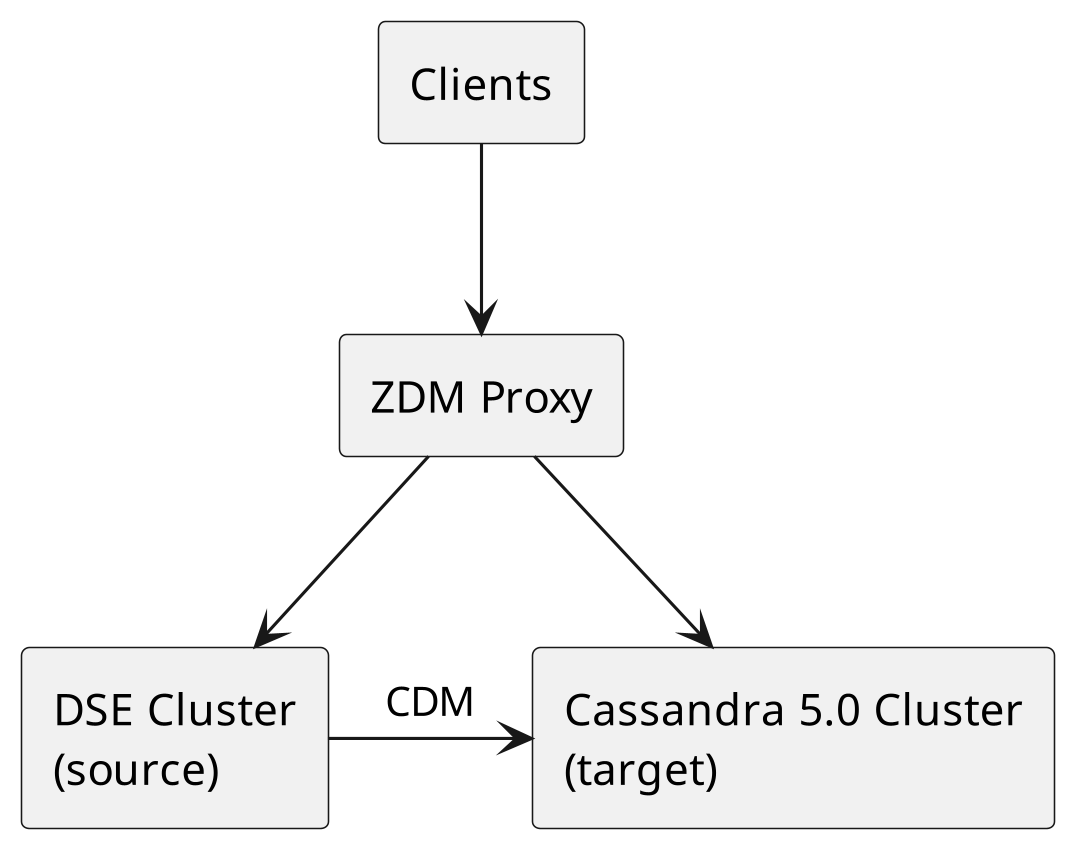
All DSE versions use the same migration approach: Cassandra Data Migrator (CDM) + Zero-Downtime Mi-gration (ZDM) Proxy to a new Apache Cassandra 5.0 cluster. The timeline depends on data volume, network bandwidth, and compaction load.
| Estimated Timeline (6-node cluster) | Downtime |
|---|---|
| 1-5 days depending on data volume | None (ZDM Proxy handles traffic) |
CDM/ZDM eliminates time pressure by running both clusters simultaneously with a proxy managing traffic routing.
Replacing DSE Components
Each proprietary DSE component has a well-established open-source replacement. This section provides the technical detail needed to plan each component migration.
Replacing DSE Search with OpenSearch
Why OpenSearch DSE Search is a modified version of Apache Solr 6.0.1, released in 2016, with propri-etary enhancements. OpenSearch is the recommended replacement as an open-source, community-driven search and analytics engine derived from Elasticsearch 7.10.2.
OpenSearch vs DSE Search
| Aspect | OpenSearch | DSE Search, Solr 6.0.1 |
|---|---|---|
| License | Apache 2.0, fully open source | Proprietary, DSE license required |
| Query language | OpenSearch Query DSL | Solr query syntax via CQL |
| Scalability | Independent cluster scaling | Tied to DSE cluster topology |
| Feature development | Active community development | Stagnant, based on Solr 6.0.1 released in 2016 |
| Operational tooling | Mature ecosystem, OpenSearch Dashboards, alerting, anomaly detection | OpsCenter only |
| Infrastructure | Dedicated search cluster | Co-located within a DSE data center |
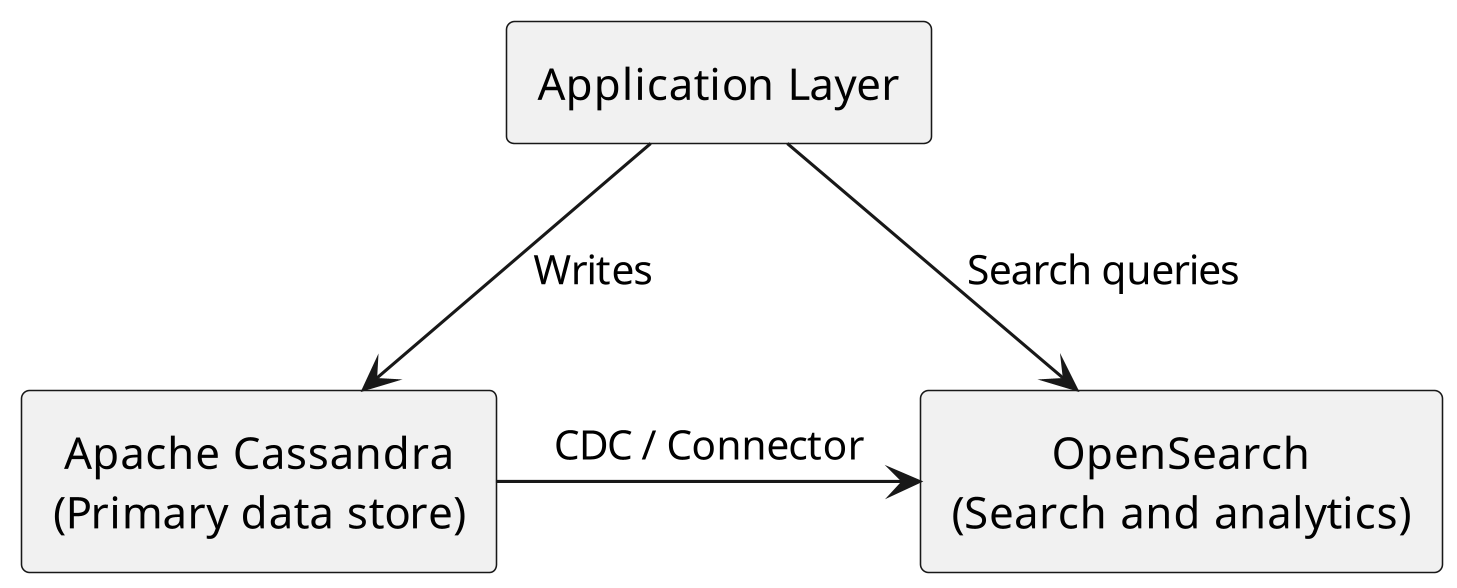
Migration Architecture The recommended architecture separates search infrastructure from the Cassan-dra data layer:
Migration Steps
- Inventory existing DSE Search indexes. For each table with a DSE Search index, document the indexed columns, analyzers, and query patterns:
cqlsh -e "DESCRIBE SEARCH INDEX ON keyspace\_name.table\_name"- Deploy OpenSearch cluster. Size the cluster based on your search workload. OpenSearch can be deployed on-premises, in your cloud account, or via managed services.
- Design OpenSearch index mappings. Translate DSE Search schema definitions to OpenSearch map-pings:
{
    "mappings": {
        "properties": {
            "name": { "type": "text", "analyzer": "standard" },
            "age": { "type": "integer" },
            "status": { "type": "keyword" },
            "description": { "type": "text", "analyzer": "english" }
        }
    }
}-
Set up data synchronization. Use one of the following approaches to keep OpenSearch in sync with Cassandra:
-
CDC + Kafka pipeline: CDC was introduced in Cassandra 3.8 (CASSANDRA-8844) and has been production-hardened in subsequent releases. CDC streams changes to a Kafka topic, which an OpenSearch sink connector then indexes automatically. This is the recommended approach for production deployments.
-
Application-level dual writes: Write to both Cassandra and OpenSearch from your application. Simpler, but introduces consistency risk if one write fails.
-
Spark batch jobs: Use the Spark-Cassandra Connector for initial data load and periodic full re-syncs.
-
-
Translate query patterns. DSE Search uses Solr query syntax embedded in CQL. OpenSearch uses its own Query DSL:
| DSE Search, Solr query | OpenSearch equivalent |
|---|---|
WHERE solr_query = '{"q": "name:John"}' | {"query": {"match": {"name": "John"}}} |
WHERE solr_query = '{"q": "age:[25 TO 35]"}' | {"query": {"range": {"age": {"gte": 25, "lte": 35}}}} |
WHERE solr_query = '{"q": "status:active AND region:US"}' | {"query": {"bool": {"must": [{"term": {"status": "active"}}, {"term": {"region": "US"}}]}}} |
-
Update application code. Replace CQL search queries with OpenSearch client calls. Most languages have well-maintained OpenSearch client libraries.
-
Validate search results. Compare query results between DSE Search and OpenSearch to ensure parity before cutover.
Data Synchronization Strategies
| Strategy | Best For | Latency | Complexity |
|---|---|---|---|
| CDC + Kafka + Connector | Real-time sync, high throughput | Sub-second | Medium |
| Application dual-write | Simple architectures, low volume | Immediate | Low |
| Spark batch jobs | Initial migration, periodic full sync | Minutes to hours | Low |
For most production deployments, CDC with a Kafka-based pipeline provides a good balance of reliability and latency. If this approach introduces Kafka into your stack, or if Kafka is already part of your infrastructure, AxonOps provides full Kafka monitoring and operational support alongside Cassandra, giving your team a unified view across both platforms without adding additional monitoring tools.
Replacing DSE Analytics with Apache Spark
Architecture Change DSE Analytics co-locates Spark executors on the same nodes as Cassandra. This is a key architectural difference from the open-source approach.
DSE Architecture (co-located):
Node 1: [Cassandra + Spark Executor]
Node 2: [Cassandra + Spark Executor]
Node 3: [Cassandra + Spark Executor]
Open-Source Architecture (separated):
Cassandra Nodes:       Spark Cluster:
Node 1                 Spark Master
Node 2                 Spark Worker 1
Node 3                 Spark Worker 2
Tip
Tip: Running Spark on separate hardware from Cassandra eliminates resource contention. In practice, many DSE users experience GC pressure and latency spikes when Spark jobs run on the same JVM heap as Cassandra. A standalone Spark cluster gives you independent scaling and resource isolation.
Deployment Options: Standalone vs Kubernetes There are two common ways to deploy Apache Spark alongside Cassandra.
Standalone Spark cluster. Provision dedicated Spark master and worker nodes on their own hardware. This is the most direct replacement for DSE Analytics and is straightforward to operate for teams already com-fortable with managing Spark. Workers run continuously, jobs submit to the cluster, and resource allocation is managed by Spark itself. This approach works well when you have steady analytical workloads and a team that prefers traditional VM or bare-metal infrastructure.
Spark on Kubernetes via the Apache Spark Kubernetes Operator. The official Spark Operator runs Spark jobs as Kubernetes custom resources, with executors spun up on-demand and torn down when jobs finish. This is particularly effective for organizations that already run Kubernetes, have bursty or on-demand ana-lytics workloads, or want proper resource management across mixed workloads. Instead of maintaining an always-on Spark cluster, each job declaratively requests the resources it needs and Kubernetes handles scheduling, scaling, and cleanup. You get native integration with cluster autoscaling, quota enforcement, and standard Kubernetes observability.
Choosing between them:
| Aspect | Standalone Spark | Spark on Kubernetes Operator |
|---|---|---|
| Best for | Steady, predictable workloads | Bursty or on-demand workloads |
| Resource model | Always-on worker pool | On-demand executor pods |
| Prerequisite | VM or bare-metal Spark cluster | Existing Kubernetes cluster |
| Scaling | Manual or external automation | Native Kubernetes autoscaling |
| Operations | Traditional Spark admin | Declarative CRDs, standard Kubernetes tooling |
Both approaches use the same Apache Spark and spark-cassandra-connector — the difference is purely how Spark itself is deployed. If your organization is already invested in Kubernetes, the operator approach often provides better resource utilization and operational consistency. If you have a dedicated analytics team and predictable workloads, the standalone approach is simpler to operate.
Version Mapping Use this table to determine which open-source Spark version matches your current DSE deployment:
| DSE Version | Bundled Spark Version | Open-Source Spark Equivalent | Recommended Connector |
|---|---|---|---|
| DSE 5.1 | Spark 2.0 | Apache Spark 3.x | spark-cassandra-connector 3.x |
| DSE 6.0 | Spark 2.2 | Apache Spark 3.x | spark-cassandra-connector 3.x |
| DSE 6.8+ | Spark 2.4 | Apache Spark 3.x | spark-cassandra-connector 3.x |
Note
The table above shows the bundled Spark versions for reference, but all DSE installations should migrate directly to Apache Spark 3.x with spark-cassandra-connector 3.x. Spark 2.0 - 2.4 are end-of-life and should not be used as migration targets. The 3.x connector supports Cassandra 3.11+, so it works regardless of which DSE version you are migrating from.
Migration Steps
-
Export your Spark job definitions. Inventory all Spark jobs, their schedules, input/output tables, and resource requirements (executor memory, cores, parallelism).
-
Deploy a standalone Apache Spark cluster. Provision separate nodes for Spark. Size them based on your current DSE Analytics resource usage, check the Spark UI on your DSE cluster for executor memory and CPU allocation.
-
Replace DSE-specific imports. DSE Analytics uses proprietary import paths. Change them to the open-source Spark-Cassandra Connector equivalents:
// DSE Analytics imports (BEFORE)
import com.datastax.bdp.spark.DseSparkConfHelper._
import com.datastax.spark.connector._

val conf = new SparkConf()
    .setAppName("MyApp")
    .setMaster("dse://node1:9042")
    .set("spark.cassandra.auth.username", "user")
    .set("spark.cassandra.auth.password", "pass")

// Open-Source Spark + Connector imports (AFTER)
import com.datastax.spark.connector._

val conf = new SparkConf()
    .setAppName("MyApp")
    .setMaster("spark://spark-master:7077")
    .set("spark.cassandra.connection.host", "cass-node1,cass-node2,cass-node3")
    .set("spark.cassandra.auth.username", "user")
    .set("spark.cassandra.auth.password", "pass")
- Configure the Spark-Cassandra Connector. Add the connector dependency to your build:
<!-- Maven -->
<dependency>
    <groupId>com.datastax.spark</groupId>
    <artifactId>spark-cassandra-connector_2.12</artifactId>
    <version>3.5.1</version>
</dependency>
Or for spark-submit:
spark-submit \
--packages com.datastax.spark:spark-cassandra-connector_2.12:3.5.1 \
--conf spark.cassandra.connection.host=cass-node1,cass-node2,cass-node3 \ your-application.jar-
Resource planning. Allocate separate hardware for Spark workers. A starting point:
-
Spark workers: 2-4 nodes with high memory (32-64 GB) and fast local SSDs
-
Network: low-latency connection between Spark workers and Cassandra nodes
-
Storage: Spark shuffle data benefits from local NVMe storage
-
-
Test each migrated job against the same data and verify output consistency before decommissioning DSE Analytics.
Alternative: Apache Cassandra Analytics (Bulk Analytics) For workloads that require high-throughput bulk reads, writes, or ETL, Apache Cassandra Analytics is an alternative to the spark-cassandra-connector that is worth evaluating. Cassandra Analytics is an official Apache sub-project (formalized through CEP-28) that integrates Cassandra with Apache Spark by operating directly at the SSTable storage layer rather than going through the CQL read/write path.
The key architectural difference is performance. The spark-cassandra-connector reads and writes through CQL coordinators, which means analytical queries compete for resources with your production traffic. Cas-sandra Analytics bypasses CQL entirely: the Bulk Reader creates point-in-time snapshots and reads raw SSTables directly, while the Bulk Writer generates SSTables in Spark executors and imports them into Cas-sandra via the Cassandra Sidecar. CEP-28 reports throughput of up to 1.7 Gbps/instance for reads and 7 Gbps/instance for writes, an order-of-magnitude improvement over the CQL-based connector.
The project also includes a CDC implementation (CEP-44) that reads Cassandra commit logs, deduplicates across replicas, and publishes to Kafka in Avro format.
Another notable capability is coordinated multi-cluster writes. The Bulk Writer can write the same dataset to multiple Cassandra clusters simultaneously by staging SSTables in S3-compatible object storage and using a two-phase coordination protocol: SSTables are first staged on all target clusters and data consistency is verified, then the import proceeds and consistency is validated across each cluster. This is particularly rele-vant for organizations operating active-active multi-region deployments or maintaining separate analytical and production clusters.
Cassandra Analytics supports Cassandra 4.0 and 5.0 (including the BTI SSTable format), requires Apache Cassandra Sidecar, and runs on Spark 3.x. The project is pre-1.0 (current version: 0.3.0) but actively devel-
oped under the Apache Cassandra umbrella. For teams running large-scale analytical workloads against Cassandra, it provides a more efficient foundation than the CQL-based connector.
| Aspect | spark-cassandra-connector | Cassandra Analytics |
|---|---|---|
| Data access | CQL read/write path | Direct SSTable reads and writes |
| Cluster impact | Higher, uses coordinator resources | Minimal, snapshot-based reads |
| Throughput | Limited by CQL path | Orders of magnitude faster |
| CDC support | No | Yes, commit log to Kafka |
| Multi-cluster writes | No | Yes, coordinated via S3 |
| Requires Sidecar | No | Yes |
| Maturity | Stable, 3.5.1 | Pre-1.0, 0.3.0 |
Replacing DSE Graph
Many DSE deployments include Graph as part of the license but never use it in production. Before planning a graph migration, verify that graph schemas and queries are actually active.
# Check for graph keyspaces
cqlsh -e "DESCRIBE KEYSPACES" | grep -i graph

# Check for Gremlin query activity in logs
grep -r "Gremlin\|TinkerPop\|graph" /var/log/cassandra/
If graph is not in use, skip this section entirely.
Option A: Denormalize into Cassandra Tables
For simple graph traversals (1-2 hops, known query patterns), you can model the relationships as denormal-ized Cassandra tables. This eliminates the need for a graph database entirely.
Example converting a “user follows user” graph:
-- Graph model: User -[FOLLOWS]-> User

-- Cassandra equivalent: forward lookup
CREATE TABLE user_follows ( follower_id UUID, followed_id UUID, followed_at TIMESTAMP,
PRIMARY KEY (follower_id, followed_id)
);

-- Cassandra equivalent: reverse lookup
CREATE TABLE user_followers ( followed_id UUID, follower_id UUID, followed_at TIMESTAMP,
PRIMARY KEY (followed_id, follower_id)
);
This approach works well when:
-
Query patterns are well-defined and limited
-
Traversal depth is 1-2 hops
-
The graph model is relatively simple
Option B: JanusGraph with Cassandra Backend
For complex graph workloads with deep traversals, variable query patterns, or heavy use of Gremlin, de-ploy JanusGraph with Cassandra as the storage backend. JanusGraph is open-source (Apache 2.0), uses standard Apache TinkerPop Gremlin, and stores graph data in Cassandra tables.
| Feature | DSE Graph | JanusGraph |
|---|---|---|
| Traversal language | Gremlin, with DSE extensions | Gremlin, standard Apache TinkerPop |
| Schema definition | Groovy-based schema API, Classic / CQL, Core Engine 6.8+ | JanusGraph Management API |
| Storage backend | Cassandra, native integration within DSE | Cassandra via CQL, pluggable |
| Index backend | DSE Search, built-in | Elasticsearch, Solr, or Lucene, pluggable |
| Deployment model | Co-located on DSE nodes, same JVM | Separate JVM process, connects to Cassandra over CQL |
| Multi-DC replication | Inherited from DSE | Inherited from Cassandra because graph data is stored in Cassandra tables |
| Authentication | DSE unified authentication | JanusGraph Server authentication or application-level |
| License | Proprietary, DSE license | Open-source, Apache 2.0 |
Deployment architecture. DSE Graph runs co-located within the DSE JVM on each node. JanusGraph is a separate process that connects to Cassandra as a storage backend over CQL. This means JanusGraph scales independently of Cassandra and each tier is sized and tuned separately. The trade-off is an addi-tional network hop between the graph engine and the storage layer, which adds latency compared to DSE Graph’s in-process access. For most workloads this is negligible, but latency-sensitive traversals should be benchmarked during migration validation.
Schema translation. DSE Graph and JanusGraph use different schema APIs. The following example shows how a simple graph schema translates between the two:
// DSE Graph schema definition
schema.propertyKey('name').Text().single().create()
schema.propertyKey('age').Int().single().create()
schema.vertexLabel('person').properties('name', 'age').create()
schema.propertyKey('since').Timestamp().single().create()
schema.edgeLabel('knows').properties('since').connection('person', 'person').create()


// JanusGraph equivalent
graph = JanusGraphFactory.open('conf/janusgraph-cql.properties') mgmt = graph.openManagement()
name = mgmt.makePropertyKey('name').dataType(String.class)
.cardinality(Cardinality.SINGLE).make()

age = mgmt.makePropertyKey('age').dataType(Integer.class)
.cardinality(Cardinality.SINGLE).make()
person = mgmt.makeVertexLabel('person').make()
mgmt.addProperties(person, name, age)

since = mgmt.makePropertyKey('since').dataType(Long.class)
.cardinality(Cardinality.SINGLE).make()
knows = mgmt.makeEdgeLabel('knows').multiplicity(MULTI).make()
mgmt.addProperties(knows, since)
mgmt.addConnection(knows, person, person)
mgmt.commit()
Index backend. JanusGraph supports pluggable index backends for
full-text search and graph-level indexing. The officially supported
backends are Elasticsearch, Apache Solr, and Apache Lucene. JanusGraph
does not officially support OpenSearch. While OpenSearch 2.x can be
made to work via a compatibility setting
(compatibility.override\_main\_response\_version: true in
opensearch.yml), this workaround was removed in OpenSearch 3.0. If
your environment requires OpenSearch, deploy a separate Elasticsearch
instance for JanusGraph indexing.
Gremlin dialect differences. DSE Graph extends standard TinkerPop Gremlin with proprietary APIs. During migration, watch for these caveats:
-
DseGraph.traversal()calls are replaced with standardgraph.traversal()calls. Note thatDse-Graph.traversal()is a traversal-builder for serialization in the DSE Java driver, not a live traversal source. -
DSE Graph remote connection classes (
DseCluster,DseSession) are replaced with JanusGraph’s connection model (JanusGraphFactory.open()). -
DSE-specific search and geospatial predicates have no direct equivalent in standard TinkerPop and require replacement.
-
DSE Graph Frames (Spark integration), if used, require evaluation on whether the analytics workload can use standalone Spark with the Spark-Cassandra Connector, or requires JanusGraph’s OLAP traver-sals via
graph.compute().
Standard TinkerPop Gremlin steps (g.V(), g.E(), addV(), addE(), path
steps, etc.) work without modifica-tion while DSE-specific extensions
(search predicates, geospatial queries) require changes.
Replacing DSE Advanced Security
Apache Cassandra provides native authentication and role-based authorization. Because DSE 6.x is a fork of Cassandra 3.11, DSE customers do not have access to the substantial security improvements that have landed in open-source Cassandra 4.x and 5.0. In several areas, open-source Cassandra today offers capa-bilities that DSE Advanced Security does not.
Mapping DSE Security Features The following table maps DSE security features to open-source equiva-lents.
| DSE Security Feature | Open-Source Equivalent | Notes |
|---|---|---|
| Internal authentication | Cassandra PasswordAuthenticator | Built-in, no changes needed |
| LDAP authentication | Third-party authenticator plugins | Community-maintained plugins available |
| Kerberos authentication | Third-party authenticator plugins | Requires custom IAuthenticator implementation or plugin |
| Role-based access control | Cassandra CassandraAuthorizer | Built-in roles and permissions |
| Row-level access control | Application-level filtering | No native equivalent in OSS; implement in the application layer |
| Transparent data encryption | Cassandra native encryption, commitlog and hints since 3.4, SSTable encryption via filesystem-level tools | DSE TDE is more comprehensive; plan for filesystem-level encryption such as dm-crypt or LUKS for SSTable-at-rest encryption |
| Client-to-node encryption | Cassandra native TLS | Configure in cassandra.yaml under client_encryption_options |
| Node-to-node encryption | Cassandra native TLS | Configure in cassandra.yaml under server_encryption_options |
Security Capabilities in Modern Cassandra That DSE Lacks Because DSE is built on Cassandra 3.11, it does not benefit from the following security enhancements that have been added to open-source Cassandra:
-
CIDR / IP allowlist authorizer. CASSANDRA-18592 introduced a native CIDR filtering authorizer that restricts which network ranges a given role can connect from. This provides network-level access control enforced at the database layer, not just at the firewall.
-
Datacenter-level role restrictions. The CassandraNetworkAuthorizer (CASSANDRA-13985, added in Cassandra 4.0) lets you restrict roles to specific datacenters via ACCESS TO DATACENTERS {…} on CREATE ROLE and ALTER ROLE, useful for compliance and workload isolation. CASSANDRA-17478 further prevents accidentally removing a datacenter from system_auth replication while nodes are still active, and CASSANDRA-20225 (CVE-2025-24860) fixes a privilege-escalation bug where users with restricted DC/CIDR access could update their own permissions. DSE 6.x, being Cassandra 3.11-based, has none of these.
-
Bulk permission grants. CASSANDRA-17030 allows granting or revoking multiple permissions in a single statement, and CASSANDRA-17027 allows granting permissions for all tables in a keyspace with one statement. This significantly reduces the operational burden of managing large RBAC poli-cies.
-
Pre-hashed password support. CASSANDRA-17334 allows CQL CREATE ROLE and ALTER ROLE state-ments to accept pre-hashed passwords. This means passwords can be hashed externally (e.g., in your identity management system) and never transmitted in plain text to Cassandra.
-
Authentication rate limiting. CASSANDRA-17812 rate-limits new client connection auth setup to pre-vent bcrypt overload, and CASSANDRA-21202 rate-limits password changes. Both protect against abuse and accidental denial-of-service.
-
Certificate-based internode authentication. CASSANDRA-17661 adds mutual TLS authentication be-tween nodes, and CASSANDRA-17923 supports mixed-mode authentication during TLS upgrades so you can roll out cert-based auth without downtime.
-
PEM-based SSL material. CASSANDRA-17031 adds support for PEM-formatted certificates and keys, eliminating the need to maintain Java keystores as a separate format.
-
Pluggable SSL context creation. CASSANDRA-16666 makes SSL context creation extensible, en-abling integration with external key management systems and HSMs.
-
Modern TLS defaults in tooling. CASSANDRA-21007 updates cassandra-stress so it no longer forces deprecated TLS 1.2-only ciphers, allowing TLS 1.3 auto-negotiation during load testing. (Server-
side TLS 1.3 negotiation is handled by the JVM’s JSSE layer.)
-
Audit logging hardening. CASSANDRA-16725 adds a nodetool getauditlog command for querying runtime audit log configuration, CASSANDRA-16669 obfuscates passwords in DCL au-dit events, and CASSANDRA-20856 redacts keystore, truststore, and TDE passwords from the system_views.settings virtual table.
-
Dynamic data masking. CEP-20 / CASSANDRA-17940 introduced native CQL masking functions in Cassandra 5.0 (mask_default, mask_null, mask_hash, mask_inner, mask_outer, and mask_replace), along with new UNMASK and SELECT_MASKED permissions for role-based masking of sensitive columns without application-layer changes.
-
Auth cache management. CASSANDRA-17063 makes auth cache capacity, validity, and update inter-vals configurable via nodetool at runtime, and CASSANDRA-16914 exposes auth caches as virtual tables for inspection.
-
Startup resilience. CASSANDRA-16783 delays auth setup until after gossip has settled, eliminating authentication unavailability during cluster startup.
For organizations with strict compliance requirements (PCI, HIPAA, SOC 2), these capabilities materially change what is achievable without custom development. A full list of changes is available in the Apache Cassandra CHANGES.txt.
Tip
Before migrating, export your DSE security configuration (dse.yaml security section, roles, and permissions). Recreate roles and grants on the target Cassandra cluster using CQL CREATE ROLE and GRANT statements. Test authentication and authorization thoroughly before switching production traffic.
Migrating DSE Drivers
The DSE-specific drivers (dse-java-driver, dse-python-driver, etc.)
were unified into the standard open-source DataStax drivers in 2020.
All DSE-specific functionality (graph traversal APIs, geospatial type
bind-ings, DSE authentication, continuous paging) was merged into the
open-source driver under the Apache License v2.0. The DSE drivers
reached end-of-life on January 1, 2022.
The official DSE drivers are no longer maintained. All new features, bug fixes, and security patches go exclusively into the unified open-source drivers. Applications still using the DSE drivers should migrate to the unified drivers regardless of whether they are migrating off DSE, as continuing to run on unmaintained drivers is an accumulating technical risk.
For most applications, the migration is a dependency and import change:
| Language | DSE Driver Artifact | Unified Driver Artifact | Unified Since |
|---|---|---|---|
| Java | com.datastax.dse:dse-java-driver-core | com.datastax.oss:java-driver-core, now org.apache.cassandra:java-driver-core in recent releases after the ASF donation | 4.4.0 |
| Python | dse-driver | cassandra-driver | 3.21.0 |
| Node.js | dse-driver | cassandra-driver | 4.4.0 |
| C# | Dse | CassandraCSharpDriver | 3.13.0 |
| C++ | dse-cpp-driver | cassandra-cpp-driver | 2.15.0 |
Key class replacements (Java):
DseSession→CqlSession(which now includes all DSE functionality)DseSession.builder()→CqlSession.builder()DseDriverConfigLoader→DriverConfigLoaderDseProgrammaticPlainTextAuthProvider→PlainTextProgrammaticAuthProviderDseLoadBalancingPolicy→DefaultLoadBalancingPolicy
For other languages, the pattern is the same (replace the DSE artifact with the unified one), but the specific class and import changes differ. Consult the upgrade guide for your language:
-
Python: Upgrade Guide
-
Node.js: Upgrade Guide
-
C#: Upgrade Guide
-
C++: Upgrade Guide Migration steps:
-
Inventory driver usage. Search your application codebase for DSE-specific imports and driver artifacts (com.datastax.dse, dse-driver, dse-java-driver, dse-python-driver, etc.).
-
Update dependencies. Replace the DSE driver artifact with the unified driver in your build configuration (Maven, pip, npm, NuGet).
-
Update imports. Replace DSE-specific class/module imports with their unified equivalents. The uni-fied driver is a drop-in replacement; deprecation warnings will appear but existing code will function.
-
Test thoroughly. Run your full application test suite against a staging cluster. Pay particular attention to DSE-specific features: graph queries, geospatial types, and custom authentication.
Note
PHP and Ruby DSE drivers remain in maintenance mode and were not merged into a unified driver. Teams using these languages will need to migrate to a community-maintained Cassandra driver or switch to a supported language driver.
Replacing NodeSync and OpsCenter
NodeSync
NodeSync is a proprietary continuous repair mechanism exclusive to DSE. AxonOps Adaptive Repair is an
alternative that automatically adjusts repair intensity based on real-time cluster workload.
OpsCenter
OpsCenter only supports DSE. The following table maps OpsCenter features to their AxonOps equivalents.
| OpsCenter Feature | AxonOps Equivalent |
|---|---|
| Performance dashboards | Dashboards |
| Alert rules | Curated alerts + custom rules |
| Repair service | Adaptive Repair |
| Backup service | Backup with PITR |
| Node administration | Rolling restarts, nodetool integration |
| Log viewing | Integrated log management |
| Capacity planning | Metrics and trending dashboards |
| Service monitoring | Service health checks |
| Multi-DC visibility | Multi-cluster support |
| Security | LDAP/SAML authentication |
Operational Comparison: AxonOps vs OpsCenter
For teams evaluating the operational impact of moving from OpsCenter to AxonOps, the following table summarizes key architectural differences.
| Aspect | AxonOps | OpsCenter |
|---|---|---|
| Open-source Cassandra support | Cassandra 3.11, 4.x, 5.x, and Cassandra 6.0 support on the roadmap | DSE, Cassandra 3.11 fork, only |
| DSE monitoring | Yes | Yes |
| Deployment model | SaaS or self-hosted | Self-hosted only |
| Metrics resolution | 5 seconds | ~60 seconds |
| Agent CPU overhead | Monitors 20x more tables at half the CPU load | Higher, JMX-based collection |
| Agent network traffic | 86% less than JMX Exporter; 99.62% less than MCAC | Standard JMX / MCAC |
| Agent connectivity | Outbound websocket, no inbound firewall rules | Requires inbound access |
| Tables monitored | 1,000+ | ~100 |
| Repair strategy | Adaptive, workload-aware | Static scheduling |
| Backup PITR | Yes | Yes |
| Kafka support | Yes | No |
| Free tier | Yes, up to 3 nodes | No, requires DSE license |
| Provisioning | AxonOps Ansible Collection | Yes |
Tip
Because AxonOps supports both DSE and open-source Cassandra simultaneously, you can monitor your entire cluster through a single pane of glass during the migration. OpsCenter will stop working as soon as you replace DSE nodes with open-source Cassandra nodes.
The Migration Process
The migration from DSE to open-source Apache Cassandra is a phased process with clear decision points at each stage. Each phase includes specific steps, go/no-go criteria for proceeding, and a rollback procedure. This structure allows engineering leadership to manage the migration as a controlled project with defined checkpoints.
Phase 0: Assessment
This phase is purely analytical, no changes are made to the running cluster.
-
DSE Feature Inventory. Reference the proprietary components table from the “Understanding DSE Lock-In” section earlier in this document. For each component, determine whether it is actively used in your deployment.
-
DSE Version and SSTable Compatibility. Determine your DSE version and reference the SSTable com-patibility table from earlier in this document. All DSE versions require a data migration strategy (CDM/ZDM) to safely reach current Apache Cassandra 5.x. DSE 6.0+ has the additional complication of incompatible SSTables and proprietary system keyspaces that prevent in-place migrations.
-
Schema Audit. DSE extends standard CQL with proprietary syntax. Before migrating, identify any DSE-specific CQL extensions in your schema:
- Export your full schema:
cqlsh -e "DESCRIBE FULL SCHEMA" > schema_export.cql- Search for DSE-specific data types (geospatial and date range types that do not exist in open-source Cassandra):
grep -i "PointType\|LineStringType\|PolygonType\|DateRangeType" schema_export.cql- Search for DSE-specific table and keyspace options:
grep -i \ "nodesync\|TieredCompactionStrategy\|MemoryOnlyStrategy\|EverywhereStrategy" \ schema_export.cql- Search for DSE Search indexes:
grep -i "SEARCH INDEX\|Cql3SolrSecondaryIndex" schema_export.cql- Search for DSE Graph schemas (Classic and Core Engine):
grep -i "CREATE GRAPH\|system_graphs\|VERTEX LABEL\|EDGE LABEL\|graph_engine" \ schema_export.cql- Search for DSE-specific UDF extensions:
grep -i "DETERMINISTIC\|MONOTONIC" schema_export.cql- Document all DSE-specific elements for translation to open-source equivalents.
Go/No-Go: All DSE features are inventoried with documented replacement strategies. No unknown depen-dencies remain.
Rollback: No changes have been made. No rollback needed.
Phase 1: Monitoring Setup
Before migrating anything, install AxonOps on your existing DSE cluster. AxonOps supports both DSE and open-source Apache Cassandra, so it provides continuous monitoring throughout the migration.
-
Install the AxonOps agent on each DSE node.
-
Configure the agent to connect to your AxonOps dashboard (SaaS or self-hosted).
-
Configure Cassandra to load the axon-cassandra-agent.
-
Perform a rolling restart of Cassandra, then restart the axon-agent services.
-
Verify all nodes appear in the AxonOps dashboard with metrics flowing.
-
Establish baseline metrics before migration:
- Read/write latency (p50, p99)
- Throughput (ops/sec)
- Disk usage per node
- CPU usage per node
- Heap usage per node
- GC pause times
- Pending compactions
- Dropped mutations
- Read/write timeouts
Tip
Because AxonOps supports both DSE and open-source Cassandra simultaneously, you can monitor your entire cluster through a single pane of glass during the migration. OpsCenter will stop working as soon as you replace DSE nodes with open-source Cassandra nodes.
Go/No-Go: All DSE nodes visible in AxonOps with metrics flowing. Baseline metrics documented.
Rollback: Uninstall AxonOps agents. No impact to DSE cluster.
Phase 2: Component Migration
This is where you deploy the replacement components identified in Phase 0 and validated in the “Replacing DSE Components” section.
-
Deploy OpenSearch cluster and create index mappings (if replacing DSE Search)
-
Deploy standalone Spark cluster (if replacing DSE Analytics)
-
Migrate Spark jobs to open-source connector
-
Set up JanusGraph or denormalized tables (if replacing DSE Graph)
-
Configure replacement security mechanisms
-
Migrate application drivers from DSE driver to unified DataStax driver
-
Validate all replacement components in staging
Each component replacement should be validated independently in a staging environment before proceed-ing to node migration. The detailed migration procedures for each component are covered in the “Replacing DSE Components” section earlier in this document.
Go/No-Go: All DSE-specific components have tested open-source replacements running in staging.
Rollback: Shut down replacement components. DSE cluster remains unchanged.
Phase 3: Node Migration
This phase covers the actual cluster migration. The approach depends on your DSE version and SSTable compatibility, as determined in Phase 0.
Provision Target Nodes. Prepare new nodes with Apache Cassandra 5.0 installed. Configure cassan-dra.yaml to match your existing cluster settings (cluster name, snitch, seed nodes, partitioner). Install the AxonOps agent on each new node. Do not start Cassandra yet.
Data Migration with CDM + ZDM Proxy All DSE versions require a data migration to safely reach Apache Cassandra 5.0. Even DSE 4.x/5.x, whose SSTables are compatible with their underlying Cassandra versions (2.0 - 3.11), cannot be migrated in-place to Cassandra 5.0 since those older versions are multiple major versions behind. DSE 6.0+ has the additional constraint of incompatible SSTables and proprietary system keyspace replication strategies (EverywhereStrategy) that prevent OSS Cassandra nodes from joining a DSE cluster entirely.
When setting up nodes to run CDM and the ZDM proxy, consider the official hardware recommendations for each service. Depending on the throughput and data load of the cluster, at least three ZDM proxy instances, one jumphost/monitoring instance, and one instance to run CDM will be required.
The upstream DataStax ZDM Proxy is intended for migrations from Cassandra to DataStax Astra, not from DSE to open-source Apache Cassandra. Migrating in the opposite direction often requires different ap-proaches. AxonOps maintains a fork of ZDM Proxy that incorporates enhancements and fixes based on real-world DSE-to-Cassandra migration experience, providing improved control and observability through-out the migration process.
Tip
If your data has short TTLs (e.g., days or weeks), you may be able to skip CDM entirely. Deploy ZDM Proxy with dual-writes enabled and leave it running until all existing data on the source cluster has expired naturally. Once the TTL window has passed, the target cluster will contain a complete dataset from dual-writes alone. This approach trades migration time for simplicity.
Cassandra Data Migrator (CDM) + Zero-Downtime Migration (ZDM) Proxy
This is the recommended approach for production clusters.
-
Provision a new Cassandra 5.0 cluster with the same topology (number of nodes, data centers, repli-cation factors) as the DSE cluster. Ensure all nodes report being UN (Up/Normal).
-
Set up the target cluster schema, roles, and credentials before enabling ZDM. Recreate all keyspaces, tables, roles, permissions, and user passwords on the target cluster. CDM does not migrate system tables, so authentication credentials must be created manually. ZDM Proxy dual-writes begin imme-diately once deployed, and writes to the target cluster will fail if the schema, roles, or permissions are not already in place. These errors can propagate back to clients.
-
Deploy the Zero-Downtime Migration (ZDM) Proxy between your application and both clusters. All reads go to the source (DSE) cluster initially; all writes are dual-written to both clusters.
-
Carefully read caveats for Cassandra Data Migrator (CDM) when it comes to collections, UDTs, and TTLs.
-
Run CDM to copy existing data from DSE to the new Cassandra cluster. CDM migrates user table data only (not system tables) and validates row-level consistency between source and target. Saving the output of CDM to a log file can help keep track of any issues that may arise during the data migration process.
-
Verify that CDM logs have an acceptable set of error messages. If not, re-run CDM to reduce error counts in subsequent passes.
-
Enable asynchronous dual reads for both clusters via ZDM Proxy configuration.
Tip
In some cases, CDM errors cannot be avoided and must be accepted even if the migration is throttled to a low throughput. In these cases, minimize the time between the final CDM autocorrect validation pass and switching reads to the target cluster. Monitor the CDM verification output closely during this window.
Go/No-Go: No dropped read or write requests on either cluster.
Rollback: Reconfigure ZDM Proxy to route all traffic back to DSE cluster. Remove new Cassandra nodes.
Phase 4: Validation
With ZDM Proxy active and dual reads enabled, run comprehensive validation before switching clients to the target cluster:
-
Cluster health check via AxonOps:
-
All nodes continue to report a status of UN (Up/Normal)
-
No active alerts
-
No pending compactions beyond normal levels
-
-
Performance comparison against baseline:
| Metric | Pre-Migration Baseline | Post-Migration | Status |
|---|---|---|---|
| Read latency (p50) | ___ ms | ___ ms | Pass/Fail |
| Read latency (p99) | ___ ms | ___ ms | Pass/Fail |
| Write latency (p50) | ___ ms | ___ ms | Pass/Fail |
| Write latency (p99) | ___ ms | ___ ms | Pass/Fail |
| Throughput (Ops/Sec) | ___ | ___ | Pass/Fail |
| Disk usage per node | ___ GB | ___ GB | Pass/Fail |
| CPU usage per node | ___ % | ___ % | Pass/Fail |
| Heap usage per node | ___ GB | ___ GB | Pass/Fail |
| GC pause (p99) | ___ ms | ___ ms | Pass/Fail |
| Pending compactions | ___ | ___ | Pass/Fail |
| Dropped mutations | ___ | ___ | Pass/Fail |
| Read/write timeouts | ___ | ___ | Pass/Fail |
- Data consistency validation:
Use CDM’s built-in
validation
functionality to investigate any failed data migrations. Failed data
migrations will appear in standard output and can be investigated
further if all output is redirected to a log file. While standard
output will display the same information stored within the
cdm\_run\_info and cdm\_run\_details tables within each targeted
keyspace, it can be easier to reason about the standard output updates
than reviewing migration issues directly using the Cassandra tables.
After investigating any data discrepancies and learning how best to
proceed, data validation can be run again with autocorrect.missing,
autocorrect.mismatch, or autocorrect.missing.counter to replace any
missing data or mismatched data. By default, counter tables are not copied when missing,
so auto-correct.missing.counter should be enabled if your application
does not delete from counter tables.
Additionally, the validation step can be further optimized by setting the job’s parameters to accommodate the cluster’s data model and data load.
- Increase replica consistency:
After a successful CDM data validation run, replica consistency can be quite low within the new cluster. To ensure all replicas are properly hosted, increase data consistency on the new cluster by running repairs across all new nodes, in a rolling fashion:
nodetool repair -pr --fullOr use AxonOps Scheduled Repairs, which allows you to schedule a Full repair over Partitioner Ranges Only.
-
Application-level validation:
-
Run your application’s integration test suite against the new cluster
-
Verify all query patterns return expected results
-
Test failover scenarios (stop one node, verify reads/writes continue)
-
-
Verify ZDM Proxy metrics:
When ZDM is deployed, it is deployed with a Grafana dashboard that ingests migration-related metrics using Prometheus.
Using all monitoring tools available during the migration is recommended, but these specialized metrics panels provide critical insight into the migration process that may not be visible in cluster-level monitoring alone. ZDM tracks properties like primary cluster reads, dual reads, and target cluster reads, and can surface performance degradations or failures that only appear in the proxy layer.
The AxonOps ZDM Proxy fork exposes additional metrics beyond what the upstream DataStax ZDM Proxy provides, giving you deeper visibility into what is happening during the migration. This is particularly valuable for detecting subtle issues that would otherwise only surface after the cutover.
Go/No-Go: All validation criteria pass. Latency and throughput on target cluster within 10% of baseline. No data loss detected. Stakeholders sign off.
Rollback: Re-evaluate. If validation fails on specific metrics, investigate root cause before deciding whether to rollback or remediate.
Phase 5: Finalize Migration
-
Switch reads to the target cluster via ZDM Proxy configuration.
-
Validate data consistency between source and target using CDM’s validation mode.
-
Confirm all user data reads are going to the target cluster. Note that ZDM Proxy will always route system table reads to the source (DSE) cluster for as long as it remains in the query path. This is expected behavior. Once you have confirmed that all non-system reads are hitting the target cluster, point clients directly at the new cluster and remove the ZDM Proxy.
-
Decommission the DSE cluster.
Go/No-Go: All activity is solely on the new cluster and no activity is on the DSE cluster.
Rollback: Once reads are directed towards the target cluster, the rollback process is to reverse the ZDM/CDM configuration: designate the Apache Cassandra cluster as the origin and the DSE cluster as the target, then re-run data migration back to DSE. However, since this reverse path is not what ZDM nor CDM were designed to do this usage is not well-tested and should be surfaced as a known risk.
Phase 6: Post-Migration Operations
With migration complete, configure AxonOps operational features. See the “Operating with AxonOps” sec-tion later in this document for detailed capability descriptions.
-
Configure Adaptive Repair. Enable for each table. AxonOps automatically throttles repair during high-traffic periods and increases throughput during low-traffic windows.
-
Configure Backup with PITR. Set up backup destinations:
-
Local filesystem
-
SFTP
-
Amazon S3
-
Google Cloud Storage
-
Azure Blob Storage
-
Enable commitlog archiving for point-in-time restore capability. Set retention policies. Test restore proce-dures in staging.
-
Migrate Alert Rules. Review and apply the pre-defined alert rules, many OpsCenter alerts have direct equivalents. Create custom rules for any gaps. Configure alert channels (Slack, PagerDuty, Microsoft Teams, ServiceNow, SMTP).
-
Set up Rolling Restart automation. Configure restart strategy and let AxonOps handle pre-flight checks and progress tracking.
-
Decommission DSE infrastructure.
-
Remove DSE packages from all nodes
-
Remove OpsCenter agents and server
-
Clean up DSE-specific config files (dse.yaml, DSE security configs)
-
Update firewall rules
-
Update runbooks and on-call documentation to reference AxonOps
-
Go/No-Go: All operational features configured and tested. Team trained on AxonOps.
Rollback: Not applicable, DSE has been decommissioned. Ensure backups are in place before reaching this phase.
Operating with AxonOps
AxonOps is an operations platform for Apache Cassandra and Kafka. It covers the full operational surface: monitoring, adaptive repair, backup with point-in-time restore, rolling restarts, alerting, and service health checks. It also includes an AI layer that provides conversational assistance, automated root cause analysis on alerts, and continuous improvement recommendations across your infrastructure. This section serves as a standalone reference for teams operating Cassandra with AxonOps post-migration.
Monitoring
AxonOps provides real-time monitoring:
-
5-second metric resolution – 12x more granular than OpsCenter’s ~60 second intervals, enabling faster detection of latency spikes, compaction stalls, and GC pressure
-
1,000+ tables monitored per cluster – JMX-based tools typically struggle monitoring too many tables due to the overhead of polling individual MBeans
-
Lightweight agent – published benchmarks show the AxonOps agent monitors 20x more tables at half the CPU load under mixed workloads, with 86% less network traffic than JMX Exporter and 99.62% less than MCAC (DataStax Metrics Collector)
-
Pre-configured dashboards – pre-built views for read/write latency, compaction, GC, disk usage, streaming, and repair
-
Outbound websocket connectivity – the agent connects outbound to AxonOps (SaaS or self-hosted), eliminating the need for inbound firewall rules on database nodes
-
Multi-cluster, multi-DC visibility – unified view across all Cassandra clusters, including mixed DSE and open-source environments during migration
Adaptive Repair
Adaptive Repair provides a workload-aware repair strategy.
-
Automatically adjusts repair intensity based on real-time cluster load, throttles during peak traffic, in-creases throughput during quiet periods
-
Tracks repair history and coverage per table, providing visibility into what percentages of token ranges have been repaired
-
Configurable intensity and repair segment tuning
-
Full alerting on repair failures
Backup with Point-in-Time Restore (PITR)
Backup with PITR provides GUI-driven backup scheduling with multiple storage destinations:
-
Storage destinations: Local filesystem, SFTP, Amazon S3, Google Cloud Storage, Azure Blob Storage
-
Commitlog archiving: Enable continuous archiving for point-in-time restore capability, recover to any point in time, not just the last snapshot
-
Retention policies: Configure per-destination retention to manage storage costs
-
Restore testing: Test restore procedures in staging before you need them in production
-
Audit logging: Full audit trail of all backup and restore operations
Alert Rules
AxonOps provides curated alert rules:
-
Pre-configured thresholds for read/write latency, compaction pending, GC pause times, disk usage, dropped mutations, hints, and more
-
Multi-channel delivery: Slack, PagerDuty, Microsoft Teams, ServiceNow, SMTP
-
Custom rules: Create additional rules based on any collected metric
-
Alert fatigue prevention: Thresholds should be tuned to surface real problems, not noise
When migrating from OpsCenter, review the curated rules, many OpsCenter alerts have direct equivalents. Create custom rules for any organization-specific thresholds.
Rolling Restarts
Rolling restart automation eliminates the risk and tedium of manually restarting Cassandra nodes:
-
Pre-flight validation – verifies cluster health before each node restart
-
Intelligent pacing – waits for the restarted node to rejoin and stabilize before proceeding to the next
-
Progress tracking – real-time visibility into which nodes have been restarted and which remain
-
Configurable strategy – control restart order, parallelism, and wait conditions
Service Health Checks
Service health checks provide application-level validation beyond infrastructure metrics:
-
Schedule custom CQL queries to verify data accessibility and query performance
-
Define expected results and alert when checks fail
-
Deploy immediately without code changes, configure entirely through the AxonOps dashboard
AI-Powered Operations
Operating Cassandra at scale is demanding work. Clusters are complex, alerts can be noisy, and the opera-tional knowledge required to keep them healthy tends to concentrate in a small number of senior engineers. For teams migrating off DSE, this challenge is amplified as the migration itself introduces new territory.
AxonOps includes an AI layer that puts expert-level operational guidance directly in the hands of every en-gineer on the team. This is a meaningful differentiator against OpsCenter and Mission Control, neither of which offer AI capabilities. The AI is grounded in your actual infrastructure (topology, schema, configuration, metrics, and events), not generic answers from the internet.
AI Chat: On-Demand Cassandra Expertise An embedded conversational assistant lets engineers ask natural-language questions about their Cassandra clusters, topology, configuration, performance, and known issues, as well as about Cassandra concepts, AxonOps functionality, and operational best practices. Because it has visibility into your specific cluster state, answers are contextual rather than generic.
The practical impact is that junior engineers become productive faster, senior engineers are freed from repet-itive “what does this mean?” questions, and on-call engineers have an always-available expert to bounce questions off at 2am instead of paging a colleague or digging through documentation.
Automated Alert Root Cause Analysis When an alert fires, AxonOps AI automatically correlates metrics, events, and configuration state across your infrastructure to surface the most likely root cause and recom-mended remediation steps. Alert storms, where a single underlying issue triggers a cascade of dozens of alerts across latency, compaction, GC, and replication metrics, are particularly well-suited to AI-driven analysis.
Instead of handing the on-call engineer a wall of red notifications, AxonOps presents a clear, AI-generated explanation of what went wrong, why it went wrong, and what to do about it. This compresses the investiga-tion phase of incident response from minutes or hours down to seconds, and builds an audit trail of incident analysis that teams can review and learn from over time.
Continuous Recommendations Most operations teams run in reactive mode: wait for something to break, then fix it. Proactive optimization (tuning compaction strategies, reviewing replication factors, adjusting memtable configurations, identifying anti-patterns) requires time and expertise that most teams do not have spare capacity for.
AxonOps AI continuously analyzes cluster behavior, configuration, and usage patterns to generate struc-tured recommendation reports. These surface concrete improvements before problems occur, in plain language, with actionable steps. It is essentially a continuous health assessment written by something that genuinely understands your infrastructure. For engineering managers, it also provides visibility into the health trajectory of the data layer rather than just its current state.
Bring Your Own AI Enterprise AI adoption is often blocked not by willingness, but by compliance, data governance, and existing commercial agreements. Many organizations have already negotiated enterprise relationships with AI providers, have data residency requirements, or have firm preferences about which models handle their operational data.
AxonOps supports Bring Your Own AI by allowing organizations to plug in their own API key for OpenAI, Anthropic, Azure OpenAI, or another provider. This removes the single largest procurement blocker for en-terprise AI adoption and allows teams in regulated industries (financial services, healthcare, government) to use AI capabilities within their existing compliance envelope.
The Operational Impact Taken together, these capabilities shift the operational model. The traditional loop of instrument, alert, page an expert, fix, repeat is expensive and unsustainable, and it concentrates operational risk in a small number of people. An AI-augmented model moves tier-1 and tier-2 questions to the AI, reduces incident investigation from hours to seconds, surfaces issues before they become incidents, and institutionalizes operational knowledge in the platform rather than leaving it locked in individuals.
Getting Started
The free tier supports up to 3 nodes with: 5-second metrics, adaptive repair, scheduled backups, rolling restarts, service checks, and email alerting. This enables teams to evaluate the platform on real production workloads before making a commercial commitment. The documentation library at docs.axonops.com exceeds 700 pages.
Risk Assessment
Every migration carries risk. The key to managing that risk is identifying it early, quantifying its likelihood and impact, and defining specific mitigations before work begins. The following table consolidates the most significant risks from both the technical migration process and the broader strategic context.
| Scenario | Likelihood | Impact | Mitigation |
|---|---|---|---|
| SSTable or version incompatibility causes startup failure | High, if in-place swap is attempted | High | Use CDM / ZDM for all DSE versions; in-place migration is not practical |
| Data loss during migration | Low | High | Use ZDM Proxy for dual-write; validate with CDM; maintain backups |
| Performance regression post-migration | Medium | Medium | Record baseline metrics before migration; validate against baseline |
| DSE Search query patterns require translation to OpenSearch | Medium | Medium | Audit all query patterns early; translate Solr queries to OpenSearch Query DSL |
| Spark job failures after connector migration | Medium | Medium | Test all jobs in staging with the open-source connector before cutover |
| Extended migration window exceeds maintenance window | Medium | Medium | Use CDM / ZDM for zero-downtime migration; avoid time-pressured approaches |
| Security configuration gaps, LDAP / Kerberos | Low | High | Audit DSE security config; test auth thoroughly before switching traffic |
| Monitoring gap during migration | Low | High | AxonOps monitors both DSE and OSS Cassandra with unified dashboards |
| Team lacks open-source Cassandra operational experience | Medium | Medium | Evaluate operations platforms with built-in Cassandra expertise; invest in team training |
| DSE licensing costs increase during migration planning | High | High | Begin migration planning early; establish performance baselines before migration |
Cost Considerations
The technical case for migration is detailed throughout this document. The following table provides a frame-work for engineering leadership to evaluate the ongoing cost of staying on DSE against the one-time cost of migrating.
| Category | Stay on DSE | Migrate to Apache Cassandra + AxonOps |
|---|---|---|
| Database licensing | Per-node DSE license, annual, pricing set by IBM | Apache Cassandra is open-source and free |
| Database version | Forked from Cassandra 3.11, released June 2017; open-source security support ended 2024 | Production-hardened Cassandra 5.0 today; Cassandra 6.0 on the horizon with Transactional Cluster Metadata, Auto Repair, and Java 21 |
| SSTable format | Proprietary BTI format locks data into the DSE distribution | Open SSTable formats with no vendor lock-in |
| Operations tooling | OpsCenter, included with DSE license and DSE-only | AxonOps, free tier up to 3 nodes, Enterprise for larger deployments |
| Search infrastructure | DSE Search, forked from Solr 6.0.1 and frozen since 2016 | OpenSearch, open-source and actively maintained, fed via Cassandra CDC + Kafka connector |
| Migration engineering | None | One-time, 1-5 days using CDM / ZDM, zero downtime |
| Vendor risk | Roadmap, pricing, and support terms controlled by IBM | Community-driven roadmap and choice of tooling and support vendors |
The migration has a bounded, one-time engineering cost. Staying on DSE carries recurring licensing costs on a platform that is multiple major versions behind current Apache Cassandra, with no clear path to close that gap.
Migration Checklist
Use this checklist to track progress through the migration. Each phase has a go/no-go decision point and a rollback procedure.
Phase 0: Assessment
- Complete DSE feature inventory
- Identify DSE version and SSTable compatibility
- Complete schema audit for DSE-specific CQL
- Map DSE Search indexes to OpenSearch
- Inventory Spark jobs and plan connector migration
- Assess graph usage and choose replacement strategy
- Audit DSE security features and plan replacements
- Inventory application driver usage (DSE-specific imports, geospatial types, graph APIs)
Go/No-Go: All DSE features inventoried with documented replacement strategies. No unknown dependen-cies.
Rollback: No changes made. No rollback needed.
Phase 1: Monitoring Setup
- Install AxonOps agent on all existing DSE nodes
- Verify all nodes appear in AxonOps dashboard
- Record baseline performance metrics (latency, throughput, disk, GC)
- Configure initial alert rules
Go/No-Go: All DSE nodes visible in AxonOps with metrics flowing. Baseline metrics documented.
Rollback: Uninstall AxonOps agents. No impact to DSE cluster.
Phase 2: Component Migration
- Deploy OpenSearch cluster and create index mappings (if replacing DSE Search)
- Deploy standalone Spark cluster (if replacing DSE Analytics)
- Migrate Spark jobs to open-source connector
- Set up JanusGraph or denormalized tables (if replacing DSE Graph)
- Configure replacement security mechanisms
- Migrate application drivers from DSE driver to unified DataStax driver
- Validate all replacement components in staging
Go/No-Go: All replacement components tested in staging.
Rollback: Shut down replacement components. DSE cluster unchanged.
Phase 3: Node Migration
- Provision target Cassandra 5.0 nodes
- Install AxonOps agent on target nodes
- Set up target cluster schema, roles, permissions, and passwords
- Review CDM caveats for collections, UDTs, and TTLs
- Deploy ZDM Proxy instances and jumphost/monitoring instance
- Execute CDM data migration to target cluster
- Verify CDM logs for acceptable error levels
- Enable asynchronous dual reads via ZDM Proxy
- Monitor migration via AxonOps
Go/No-Go: No dropped read or write requests on either cluster.
Rollback: Reconfigure ZDM Proxy to route all traffic back to DSE. Remove new Cassandra nodes. DSE cluster remains unchanged.
Phase 4: Validation
- All nodes continue to report UN (Up/Normal) status
- Performance comparison against baseline (pass/fail table)
- CDM data consistency validation completed
- CDM autocorrect passes run for missing/mismatched data
- Full repair completed on new cluster
- Application integration tests pass
- Failover test: stop one node, verify cluster continues serving
- ZDM Proxy Grafana metrics reviewed
Go/No-Go: All validation criteria pass. Latency and throughput on target cluster within 10% of baseline. No data loss detected. Stakeholders sign off.
Rollback: Re-evaluate. Investigate root cause before deciding whether to rollback or remediate.
Phase 5: Finalize Migration
- Switch reads to the target cluster via ZDM Proxy configuration
- Validate data consistency using CDM validation mode
- Confirm all user data reads are hitting the target cluster
- Point clients directly at the new cluster and remove ZDM Proxy
- Decommission DSE cluster
Go/No-Go: All activity is solely on the new cluster and no activity is on the DSE cluster.
Rollback: Reverse ZDM/CDM configuration: designate Apache Cassandra cluster as origin and DSE cluster as target, then re-run data migration back to DSE.
Phase 6: Post-Migration Operations
- Configure Adaptive Repair
- Configure Backup with Point-in-Time Restore (PITR)
- Migrate alert rules from OpsCenter
- Set up rolling restart automation
- Decommission OpsCenter server and agents
- Remove DSE packages from all nodes
- Update runbooks and on-call documentation
Go/No-Go: All operational features configured and tested. Team trained on AxonOps.
Rollback: Not applicable, DSE has been decommissioned. Ensure backups are in place before reaching this phase.
Migration Tools Reference
| Tool | Use Case | Source |
|---|---|---|
| Cassandra Data Migrator, CDM | Large-scale data migration and row-level validation | Open-source |
| Zero-Downtime Migration, ZDM Proxy | Zero-downtime migration proxy, dual-write and read routing | Open-source |
| dsbulk, DataStax Bulk Loader | CSV and JSON export and import | Open-source |
| cqlsh COPY | Simple CSV import and export for smaller datasets | Built into Cassandra |
| sstableloader | Bulk loading SSTables from external sources | Built into Cassandra |
References
AxonOps Documentation:
- AxonOps Overview
- Cassandra Monitoring
- Adaptive Repair
- Backup Overview
- Rolling Restarts
- Alert Rules
- Service Checks
- Editions and Plans
- Compaction Strategies
- Cassandra Architecture
- Cluster Management
- Performance Tuning
- LDAP Authentication
- Kubernetes Installation
- Monitoring Cassandra: The Cost of Collecting Metrics
External References: